
You've spent hours crafting the perfect email campaign, only to see dismal open rates and even lower response rates. Your carefully written text is drowning in a sea of unopened messages. If this frustration sounds familiar, it might be time to embrace a powerful alternative: video email messages.
In today's cluttered inbox environment, "simply telling people who you are and that you're the best in your industry won't cut it," as many marketers have discovered. Text-heavy emails, no matter how well-crafted, often fail to create the personal connection needed for effective lead conversion.
Enter video emails: a format that's "short, sweet, and to the point" yet dramatically more engaging than plain text. As one marketing professional puts it, "People would rather watch than read" – a simple truth that explains why video emails are becoming essential tools for sales professionals seeking to build genuine business relationships.
This article will guide you through when to leverage video for maximum impact, how to overcome common technical hurdles, and what to say to create authentic connections that drive results.
Video creates a psychological impact that text simply cannot match. When recipients see your face and hear your voice, they experience:

These psychological advantages translate into measurable performance improvements. According to Wistia, including the word "video" in an email subject line can boost open rates by 19%. More impressively, video can increase click-through rates by 65% and reduce unsubscribes by 26%.
The business impact is equally compelling: 90% of customers report that videos aid in their buying decisions, and 59% of executives prefer watching a video to reading text, according to Mailtrap's research.
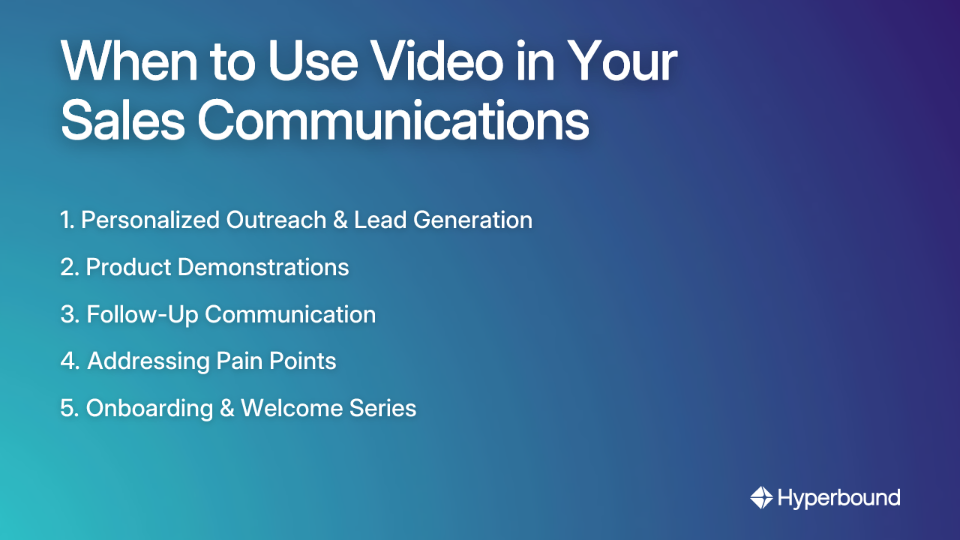
Not every email warrants a video. Understanding when video adds value versus when it's overkill is crucial for maintaining its impact and effectiveness.
One of the most common pain points with video emails is compatibility. As users frequently report, "Not all email clients support embedded videos" and attempts to directly embed video content can trigger "spam alerts for most email providers."
Despite what many assume, directly embedding videos in emails is not recommended due to several critical issues:
Instead of direct embedding, email marketing experts recommend this proven method:
This approach ensures compatibility across email clients while maintaining the engagement benefits of video content.
The ideal length for an email video is 60-90 seconds, though Vidyard suggests that initial outreach videos can range from 30 seconds to 3 minutes. Remember: your goal is to pique interest, not deliver a comprehensive presentation.
Include phrases like "[VIDEO]" or "Watch Now" in your subject line to boost open rates. This sets expectations and increases the likelihood of engagement.
Many users watch videos with sound off, particularly on mobile devices. Captions ensure your message gets across regardless of viewing environment.
Every video should end with an unmistakable call to action that tells viewers exactly what to do next, whether it's booking a call, requesting a demo, or responding with specific information.
The most effective video emails feel natural and focused on providing value rather than pushing for a sale. Here are three templates you can adapt for different scenarios:
Subject: Quick video message for [Name]
Email Body:
Hi [Name],

I created a short personalized video to introduce myself and share a specific idea about how [Your Company] might help with [Their Pain Point based on research].

[Thumbnail linking to video]

Would you be open to a brief conversation about this next week?

Best,
[Your Name]
Video Script Outline:
Subject: Following up with more thoughts on [Topic]
Email Body:
Hi [Name],

I wanted to follow up on my previous message with some additional context on how we helped [Similar Company] overcome [Specific Challenge].

[Thumbnail linking to video]

Have you had time to consider whether this might be relevant for your situation at [Their Company]?

Looking forward to your thoughts,
[Your Name]
Subject: As promised: a quick demo of [Feature] for [Name]
Email Body:
Great talking with you today, [Name]!

As mentioned, I've recorded a short demo showing exactly how [Feature] can help solve [Specific Pain Point discussed in your call].

[Thumbnail linking to video]

Feel free to share this with your team, and let me know if you have any questions.

Best,
[Your Name]
Each of these templates addresses specific pain points, uses personalization, and includes a clear call to action – essential elements for effective sales email templates.
A successful video email strategy relies on a combination of tools for practicing delivery, creating content, and sharing it effectively. Here are some platforms to build your tech stack:
To evaluate the effectiveness of your video email strategy, track these essential metrics:

A marketing agency implemented personalized video follow-up emails for leads who downloaded their content but hadn't responded to standard follow-up communication. The results were striking:
The key to their success was addressing specific pain points mentioned in the downloaded content, demonstrating understanding of the prospect's business challenges, and including a clear, low-pressure CTA.
Video email isn't just another tactic – it's a powerful approach to humanizing your digital communication in a world where genuine connection increasingly determines sales success.
To get started:
Remember that success with video email hinges on strategic application, not just technology. Your goal is to help, not just to sell. When recipients feel understood and valued rather than targeted, they're far more likely to engage with your message and consider your solution.
By mastering the art and science of video email messages, you'll cut through inbox noise, build stronger relationships with prospects, and ultimately drive better business results through more human digital communication.
The ideal length for a sales video email is between 60 and 90 seconds. This is long enough to provide value and build rapport without losing the viewer's attention. For initial outreach, aim for 30-60 seconds to pique interest, while more detailed follow-ups or demos can extend up to 3 minutes if necessary. The key is to be concise and focused on the recipient's needs.
No, you should not embed videos directly into an email. Most major email clients, including Gmail and Outlook, do not support embedded video playback. Attempting to do so can trigger spam filters and result in a poor user experience. The best practice is to insert a hyperlinked image (a thumbnail with a play button) that links to a landing page where the video is hosted.
Video emails are more effective because they create a stronger human connection, which builds trust and increases engagement. Seeing your face and hearing your voice makes your message more personal and memorable than plain text. This multi-sensory experience mimics a face-to-face interaction, leading to statistically higher open rates, click-through rates, and reply rates.
You should use video emails for high-impact communication where personalization and human connection are critical. Ideal scenarios include personalized outreach to key prospects, product demonstrations, follow-ups after meetings, and addressing specific customer pain points. Avoid using videos for simple, transactional messages like appointment reminders, where text is more efficient.
You do not need expensive equipment; your smartphone or webcam is often sufficient. The focus should be on authenticity, not high production value. A clear image from your computer's webcam or phone, combined with good lighting (facing a window helps) and clear audio, is all you need to get started. A valuable message is far more important than professional-grade gear.
You can measure success by tracking metrics like click-through rate, video play rate, view duration, and reply rates. These metrics tell you more than just who opened the email. Click-through rate shows interest, play rate shows how many started watching, and view duration indicates how engaging your content is. Compare these against your text-only emails to measure true business impact.










Use Cases
Legal