
You've meticulously researched your prospect, crafted the perfect pitch, and dialed the number with confidence. Then it happens: "Hello, ABC Company, how may I direct your call?" Your heart sinks slightly. The dreaded gatekeeper stands between you and your decision-maker.
For Sales Development Representatives (SDRs), mastering gatekeeper conversations isn't just a nice-to-have skill—it's essential for meeting quota. Yet many reps struggle with these critical interactions, approaching each call with anxiety rather than assurance.
"I'm having trouble getting past gatekeepers to reach decision-makers," admits one SDR on Reddit. "Is it even worth pitching to them?"
Fortunately, modern technology offers a solution. AI-powered simulation platforms like Hyperbound allow SDRs to practice these conversations in a risk-free environment. While some express skepticism about AI's ability to replicate realistic conversations ("ChatGPT just agrees and tells me why I'm right"), the latest generation of tools has evolved significantly. By analyzing a company's actual sales calls to identify winning behaviors, these platforms create dynamic, challenging interactions that truly prepare reps for real-world scenarios.
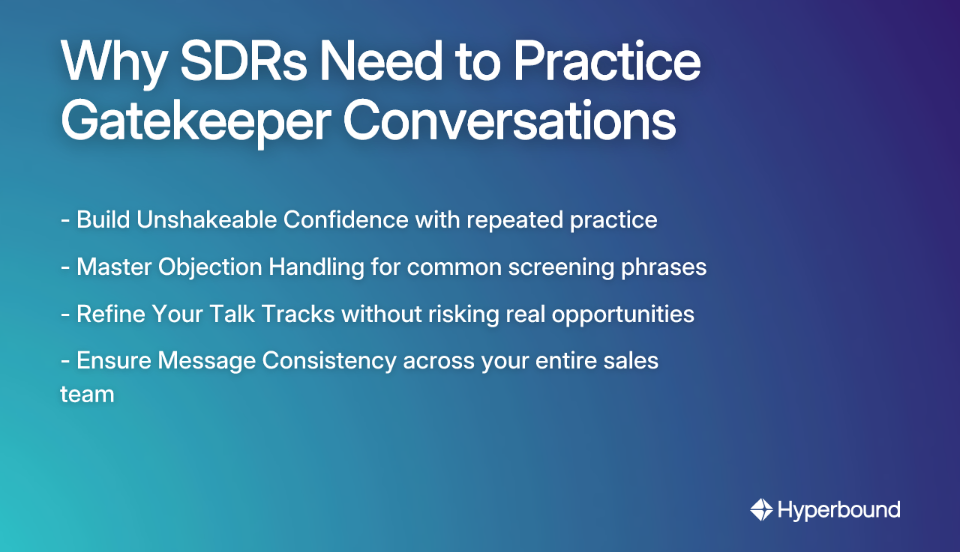
Before diving into the tools, let's clarify why deliberate practice matters:
Description: Hyperbound is an advanced AI Sales Coaching platform specifically designed to help sales teams master critical conversations through hyper-realistic AI role-plays.
Key Features for Gatekeeper Simulation:
Why It's a Top Choice: Hyperbound is purpose-built for sales scenarios, allowing unlimited practice to reduce ramp time for new hires and drive consistency across the team. By analyzing thousands of a company's actual sales calls, it creates simulations grounded in what makes top reps successful.

Description: While not a dedicated role-play simulator, Gong excels at analyzing real-world conversations to provide coaching insights.
Key Features for Gatekeeper Simulation:
How SDRs Use It: Rather than active simulation, SDRs review playlists of best-practice gatekeeper calls to learn what works. It's about learning from reality.
Description: An AI sales coaching and simulation platform that focuses on creating lifelike practice scenarios.
Key Features for Gatekeeper Simulation:
How SDRs Use It: Reps engage in structured simulations with AI characters designed to represent different gatekeeper personalities and objections.
Description: A comprehensive sales engagement platform designed to help SDRs execute their outreach cadences.
Key Features for Gatekeeper Simulation:
How SDRs Use It: SDRs access pre-approved scripts for gatekeeper calls and utilize built-in dialer and call coaching features for practice and review.
Description: A powerful conversation intelligence tool that records and analyzes sales conversations.
Key Features for Gatekeeper Simulation:
How SDRs Use It: Used primarily for post-call analysis and learning from successful peers. SDRs can search for calls where specific objections like "just send an email" were successfully overcome.
Description: An AI sales coaching tool offering both role-play simulations and real-time coaching during live calls.
Key Features for Gatekeeper Simulation:
How SDRs Use It: Reps practice with AI and then receive live support from the tool when making actual calls, serving as a safety net.
Description: A leading sales engagement platform that helps teams automate and optimize their outreach efforts.
Key Features for Gatekeeper Simulation:
How SDRs Use It: Managers use Outreach's coaching features to conduct live role-plays or coach reps during actual gatekeeper calls.
Description: An AI role-play tool specifically designed to provide sales teams with infinite practice opportunities without requiring manager involvement.
Key Features for Gatekeeper Simulation:
How SDRs Use It: SDRs use Skylar for repetitive practice on core gatekeeper scripts and objections, building muscle memory before hitting the phones.
Description: A video messaging platform that can be creatively used for practice and coaching.
Key Features for Gatekeeper Simulation:
How SDRs Use It: A manager assigns a prompt (e.g., "The gatekeeper says 'we already have a vendor for that'"), and the SDR records their response for review.
Description: A comprehensive CRM and sales enablement platform that includes tools for call tracking and coaching.
Key Features for Gatekeeper Simulation:
How SDRs Use It: More of a guided execution tool than a simulator, helping SDRs stick to the script during live calls and providing a repository for later review.
When evaluating tools for your team, consider these key factors:
.png)
While simulation tools provide valuable practice, success with gatekeepers also requires sound strategy:
Getting past the gatekeeper is one of the most fundamental and challenging skills for any SDR. While there's no magic formula, the combination of proven strategies and modern simulation technology can dramatically improve your success rate.
The key takeaway is that practice is non-negotiable. AI simulation tools have evolved beyond the "robotic" and "unrealistic" experiences of the past, offering scalable and effective ways to prepare your team for these critical conversations.
For teams looking to provide their SDRs with unlimited, risk-free practice on gatekeeper scenarios tailored to their business, Hyperbound's AI Sales Roleplays offer a best-in-class solution. By enabling reps to practice with dynamic AI personas and receive instant, objective feedback, you can reduce ramp time, drive consistent messaging, and ultimately book more qualified meetings.
A gatekeeper in sales is anyone who controls access to a decision-maker, such as a receptionist, executive assistant, or office manager. Their primary role is to screen calls and manage the decision-maker's time, making them a common challenge for SDRs. Effectively engaging with gatekeepers, rather than trying to trick them, is a critical skill for successful outbound prospecting.
To get past a gatekeeper, you should be polite, confident, and direct. Key strategies include doing your research to know the decision-maker's name, treating the gatekeeper with respect, and using simple scripts. Avoid selling to the gatekeeper; your goal is simply to be connected to your prospect.
Practicing gatekeeper conversations is crucial for building confidence, mastering objection handling, and refining your sales pitch in a risk-free environment. Repeated practice removes the anxiety associated with these calls, allows you to internalize responses to common screening phrases like "just send an email," and ensures you can test different approaches without jeopardizing real sales opportunities.
The best tools for simulating gatekeeper conversations are AI-powered sales coaching platforms like Hyperbound, Second Nature, and Skylar. These platforms provide hyper-realistic AI role-plays that allow SDRs to practice their scripts and objection handling skills. Unlike basic tools, advanced simulators offer dynamic conversations, customizable personas, and instant, actionable feedback to accelerate learning.
An AI role-play simulator works by creating a realistic, interactive conversation where a sales rep can practice their skills with an AI persona acting as a gatekeeper or prospect. The AI is programmed to respond dynamically, raise common objections, and challenge the rep. After the call, the platform provides an objective scorecard with detailed feedback on performance metrics like talk ratio, clarity, and objection handling, allowing for targeted improvement.
Yes, modern AI simulation tools can replicate highly realistic conversations with gatekeepers. While older tools or general-purpose AI like ChatGPT could feel robotic, the latest generation of platforms, such as Hyperbound, are purpose-built for sales. They often analyze a company's own sales calls to create AI personas and scenarios that accurately reflect real-world interactions, objections, and buyer personalities.









Use Cases
Legal