
Screen-sharing demos introduce pressures that most sales training programs do not address. A rep can rehearse a pitch until they know every feature, but the moment a prospect interrupts mid-navigation to ask where something went, the dynamic shifts. Navigating a complex UI, fielding objections, and managing the prospect's attention simultaneously is a distinct skill set — and one that is rarely practiced before a live deal is on the line.
That is the gap these six scenarios are designed to close. Each one identifies a specific failure mode that occurs during screen-sharing demos, quantifies what is at stake when it goes wrong, and provides a structured roleplay exercise teams can implement immediately. The objective: build muscle memory for these moments before a live prospect is on the other side of the screen.
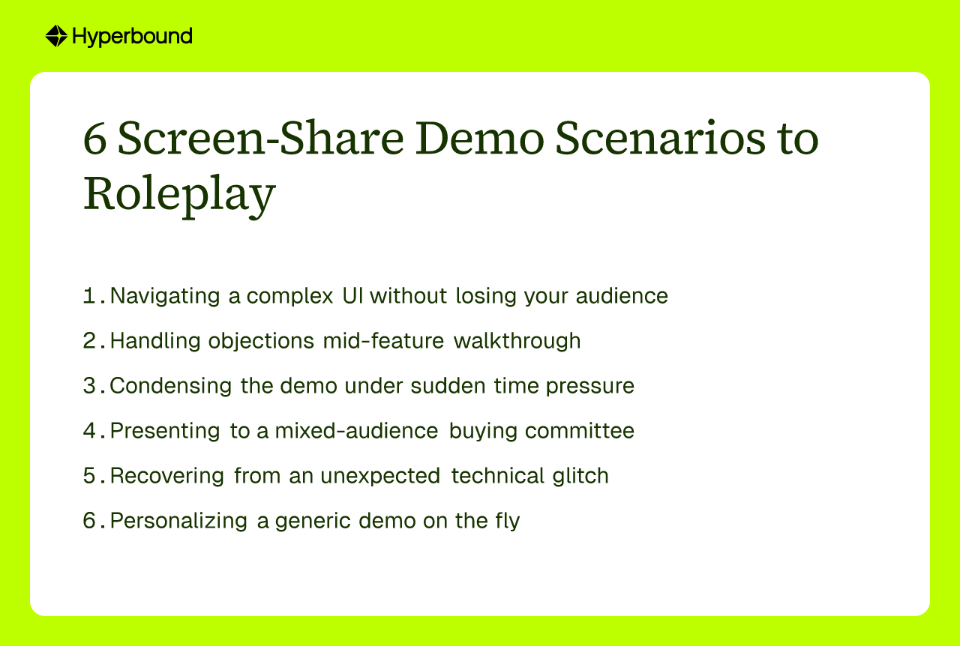
The Failure Mode: A rep clicks through a dense dashboard, narrating their actions ("I'm clicking here, now I'm going to this tab..."), but the prospect cannot track the navigation. They miss the value entirely and disengage. This is compounded when prospects are on smaller monitors, a documented frustration among sales engineers, where a cluttered UI appears even more overwhelming.
The Stakes: A confused buyer cannot connect features to outcomes. They stop asking questions, disengage mentally, and the deal stalls because they never understood the "so what."
The Roleplay Exercise:
Where Hyperbound Practice fits: This scenario requires a tool that understands what is on the screen in real time. Hyperbound's Screen Comprehension feature enables the AI to read and comprehend the slides or UI being presented, so the Distracted Director can ask context-aware questions about what they are seeing rather than simply reacting to spoken words. After the session, an AI Scorecard delivers instant, objective feedback on signposting, pacing, and engagement. No manager required to run the session.
The Failure Mode: Midway through a feature demo, the prospect interjects with a difficult objection: pricing, a competitor comparison, or implementation complexity. The rep gets flustered, abandons the demo flow, and the remainder of the call becomes reactive. This is among the most common and most costly failures: reps without structured objection handling practice are unprepared for the moment.
The Stakes: Credibility erodes. The prospect does not just doubt the product; they doubt the rep. A defensive or uncertain response signals that the team lacks real answers, and that perception carries into every subsequent conversation.
The Roleplay Exercise:
Where Hyperbound fits: Hyperbound Practice allows organizations to configure the objection patterns their teams face most, so reps aren't practicing generic objections. They're stress-testing their responses against the scenarios that actually matter. When paired with Hyperbound Perform, those objection patterns can be informed by what's surfacing in live deals across the pipeline, keeping practice grounded in real deal dynamics.
The Failure Mode: The prospect joins and immediately states, "I'm double-booked. I only have 15 minutes." The rep panics, races through slides, skips critical context, and delivers a fragmented, incoherent pitch. Skipping slides under time pressure is one of the fastest ways a well-prepared demo falls apart.
The Stakes: The prospect walks away confused about the product and unconvinced of its value. There is no urgency, no clear differentiation, and no reason to schedule a follow-up.
The Roleplay Exercise:
Where Hyperbound fits: Hyperbound Practice can be configured to simulate sudden time constraints, requiring reps to practice dynamic prioritization. After the session, the AI Scorecard analyzes whether the rep successfully identified and focused on value-based talking points, providing objective feedback on their ability to pivot under pressure.
The Failure Mode: A rep delivers a technically sound demo but loses the economic buyer entirely. They dive deep into features and workflows that excite the champion but leave the VP of Finance questioning why they were invited. This is not just a missed opportunity; it is a deal killer.
The Stakes: The rep wins a champion but loses the deal. The stakeholder holding the budget never receives the ROI narrative required to approve the purchase, and the opportunity dies in committee review. Failing to engage every stakeholder on a shared screen is among the most persistent demo pitfalls.
The Roleplay Exercise:
Where Hyperbound fits: Hyperbound's Multiparty Roleplays enable reps to practice presenting to multiple AI buyer personas simultaneously, each with distinct personalities, goals, and objections, all while sharing the same screen. The AI simulates the cross-talk, competing interests, and awkward silences of a real buying committee, so reps do not encounter that dynamic for the first time on a live call.
The Failure Mode: The demo freezes. A slide fails to load. An error message appears during the key feature walkthrough. The rep stammers, apologizes repeatedly, and clicks frantically, destroying their professional presence faster than any competitor objection could.
The Stakes: A technical issue does not just look unprofessional; it erodes trust. Prospects evaluate not just the product but the team behind it. Watching a rep lose composure over a frozen screen raises the question: Is this what post-sale support looks like?
The Roleplay Exercise:
Where Hyperbound fits: Organizations can program unexpected interruptions into Hyperbound's roleplay scenarios. The AI persona can be instructed to say, "Your screen seems to be frozen," or a simulated error message can be built into the exercise. The AI Scorecard then measures the rep's recovery time, tone of voice, and whether they successfully pivoted, converting a potential failure into a demonstration of composure.
The Failure Mode: A rep delivers a polished, feature-complete demo that lands flat. The reason: it was built for a generic "average" buyer rather than the specific industry, terminology, or pain points the prospect shared during discovery. As practitioners note, roleplays that do not reflect real customer nuance leave teams underprepared for actual conversations.
The Stakes: The prospect feels unheard. A generic demo signals that the rep either did not listen during discovery or does not understand their business. Perceived irrelevance kills deals as reliably as a poor product.
The Roleplay Exercise:
Where Hyperbound fits: Hyperbound Practice enables teams to create digital twins of specific buyers by providing a LinkedIn profile link. The AI adopts the persona's industry, title, and likely pain points, so the rep practices against a realistic proxy of their actual customer rather than a generic archetype. This shifts practice from theoretical exercises to deal-specific preparation grounded in real buyer attributes.
The difference between a forgettable demo and one that advances a deal is not talent; it is preparation for these specific, high-stakes moments. Most sales training covers the pitch. Almost none of it addresses what happens when the screen share goes sideways.
For too long, teams have relied on reviewing recorded calls after the fact. By the time a call reaches a conversation intelligence platform summary, the window to change that outcome has already closed. The better model is to intervene before the demo, building rep muscle memory in a safe environment so the live call is the performance, not the rehearsal.
Hyperbound Practice is built specifically for this. With Screen Comprehension (the AI reads and responds to what's actually on screen), Multiparty Roleplays (practice with a champion and an economic buyer simultaneously), and AI Scorecards (instant, objective feedback after every session), reps can rehearse every one of these six scenarios before they face them in the field. And when those reps take the skills they've built in practice into live deals, Hyperbound Perform scores their real calls and surfaces deal-level coaching — closing the loop from practice to revenue. Companies like Vanta cut ramp time by 60% (from 210 to 75 days) and Nivoda saw a 150% increase in demo conversion rate (from 20% to 50%) after putting their team through targeted AI roleplay practice.
Stop watching. Start winning. The Revenue Activation Era is here. Try Hyperbound's interactive demo now.
The most common mistakes include losing the audience in a complex UI, getting flustered by mid-demo objections, mishandling sudden time constraints, failing to address a mixed audience, recovering poorly from technical issues, and delivering a generic, unpersonalized pitch. Each of these failure modes can derail a demo and erode a prospect's confidence. For example, failing to signpost navigation confuses buyers, while a defensive reaction to an objection destroys credibility. Successful teams practice handling each of these moments with composure before they occur live.
To engage a mixed audience, translate product features into different value propositions for each stakeholder on the call. Show a technical user (the champion) how a feature improves their workflow, while simultaneously explaining to an economic buyer (such as a VP of Finance) how that same feature delivers measurable ROI, reduces costs, or increases revenue. Actively engage both personas by name and connect their individual needs to the overall business case.
Remain calm, acknowledge the issue without over-apologizing, and pivot to a backup plan. Composure is the critical factor. Instead of clicking frantically, take control: "It seems our demo environment is having a moment. Not to worry, I can walk you through a backup recording of this workflow." This converts a potential failure into a demonstration of professionalism and preparedness, which builds trust rather than eroding it.
Begin by dedicating time in weekly sales meetings to practice one of the six scenarios outlined in this article, assigning one person to be the rep and another to act as the buyer persona. For more realistic and scalable practice, an AI roleplay platform enables reps to practice on demand without requiring a manager's time. AI can simulate buyer personas, interject with realistic objections, and provide instant, objective feedback on performance through features like AI Scorecards.
AI roleplay provides a more consistent, scalable, and objective method for practicing complex demo scenarios than traditional approaches. Platforms like Hyperbound can simulate multiparty conversations, comprehend on-screen content to ask relevant questions, and deliver unbiased scorecards on specific criteria such as signposting and objection handling. This ensures every rep receives standardized, high-quality practice on their own schedule, removing the logistical bottlenecks and subjective feedback inherent in peer-to-peer roleplays.









Use Cases
Legal