
Stevie Case, CRO at Vanta, wasn't shopping for more software. She already had Salesforce. She already had Gong. Her stack was solid by any standard measure. But she kept hitting the same wall: she couldn't get a fast, reliable read on her pipeline's health without manually stitching together data from multiple tools. The question she brought to her evaluation wasn't "what does this tool do?" It was sharper than that. "Will this give me answers my existing stack can't?"
That question is the right starting point for any CRO or RevOps leader evaluating a sales pipeline AI assistant in 2026. It cuts through the noise. It bypasses the demo theater. And it forces vendors to prove real value instead of showcasing a polished interface.
This is not a vendor-perspective guide. It's a buyer's checklist, built from the practitioner's frame. The questions below come from how Stevie and Atul (who ran Kota internally at Perform) actually evaluated these tools, and what they found when they applied them.
Before we get to the right questions, let's talk about the wrong ones.
Most tool evaluations open with the same checklist:
These questions aren't useless. But they don't predict whether a tool will actually improve pipeline visibility. They evaluate the packaging, not the engine.
A clean UI is worthless if the insights underneath are shallow. An integration checkmark doesn't mean the tool understands your deal context, your customer history, or your CRM workflows. As one RevOps leader put it: "You're adding another tool that doesn't understand your deal context, customer history, or CRM workflows." That frustration is common. And it almost always traces back to evaluations that stopped at the surface level.
Focusing on price first is an even bigger trap. It ignores the real cost: stalled deals, inaccurate pipeline reads, and reps spending hours on manual updates when they should be selling. As practitioners have noted bluntly: "AI doesn't solve data problems. It amplifies them." If your evaluation criteria don't surface how a tool handles data quality and context, you will land a tool that amplifies your existing blind spots.
The harder, more valuable questions are about what the tool actually does with your data, and whether it can think across deals, not just within them.
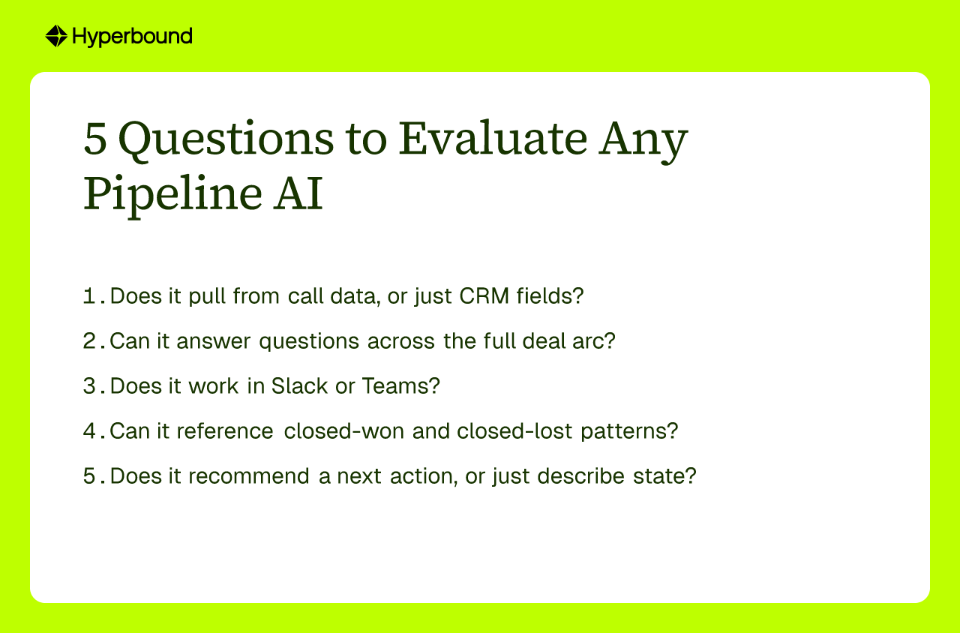
This is the foundational question. CRM data is manually entered. It reflects what reps want managers to see. It is a summary of a deal, written after the fact, filtered through optimism or self-interest. It is not the ground truth.
Call data and email data are the ground truth. They contain the unfiltered voice of the customer: the objections, the hesitations, the buying signals, the competitor mentions. If a pipeline AI assistant only reads CRM fields, it is reading a curated story, not the actual deal.
The best sales AI tools synthesize across the full tech stack, including conversation intelligence platforms like Hyperbound's Call Recorder or Gong. That synthesis is what separates a glorified reporting layer from a tool that genuinely understands where a deal stands.
Ask your vendor directly: "What data sources do you ingest, and can you demonstrate a response that reflects what was said in a discovery call, not just what was logged in the CRM?"
AI-powered call summaries are now table stakes. Nearly every major tool in this category produces them. But a summary of a single call tells you nothing about deal momentum, risk accumulation, or whether your champion has gone quiet over the past three weeks.
A true sales pipeline AI assistant connects dots across multiple interactions over weeks or months. It should be able to answer questions like:
These are deal-level synthesis questions, not lookup queries. If the tool can only answer the third type ("What is the deal value in Salesforce?"), it is a search bar, not an assistant. Push vendors to answer complex, multi-turn deal questions live in your evaluation. Watch what they can and cannot do.
Adoption dies when tools require reps to leave their primary workspace. This is not a soft preference. It is a hard adoption reality.
Sales reps live in Slack or Teams. Managers ping their teams there. Deal updates happen there. If an AI assistant lives behind its own separate login and dashboard, it will be used during the initial rollout, referenced occasionally during QBRs, and quietly ignored within 90 days.
The best tools are embedded assistants. They bring insights to where the team already operates, not the other way around. As one practitioner noted, the shift happened when "the team stopped seeing it as a chatbot and more like a junior colleague who handles routine admin so everyone can focus on the human parts." That shift only happens when the tool shows up in the right place.
Ask: "Can your reps query the assistant directly from Slack or Microsoft Teams without switching context?"

A descriptive tool tells you what is happening now. An intelligent tool tells you what it means, based on what has happened before.
This distinction is the difference between reporting and insight. If your pipeline AI assistant can only read live deal data, it has no frame of reference. It cannot tell you that a single point of contact in a deal of this size and stage is a red flag because 80% of similar deals stalled. It can only report that there is one contact listed.
Historical pattern recognition is what enables a tool to say: "Our most successful enterprise deals involved the Head of IT by stage three. This deal does not. That is worth addressing." This is the kind of proactive, contextual signal that changes how managers prepare for deal reviews.
When evaluating, ask: "Can this tool identify risks or opportunities in active deals by comparing them to historical closed-won and closed-lost patterns?" If the answer is vague, treat that as a no.
A summary of risks is useful. A concrete recommendation for what to do next is what moves deals forward.
This is the question that separates passive AI tools from active ones. A tool that describes a problem without suggesting a solution still leaves the work on the manager or rep. That cognitive load adds up fast. As one voice from the RevOps community put it: "Nothing major, just a thousand tiny tasks that kill your day."
A high-impact pipeline AI assistant should be able to say something like: "The prospect mentioned a competitor on the last call. Based on similar deals, sending the updated battlecard and scheduling a follow-up call within five days increased win rates by 18%." That is not a description of the problem. That is a path forward.
Test for this directly. Give the vendor a realistic deal scenario and ask the tool what to do next. Evaluate the quality and specificity of what it returns.
When Stevie Case applied these five questions to her evaluation, the picture became clear quickly. Her existing stack gave her data. It did not give her synthesis. Gong gave her call recordings and summaries. Salesforce gave her field values and activity logs. But neither tool could answer a question like, "What is the actual health of this deal based on everything we know?" That required a layer that could sit across both and reason about the full arc of the deal.
After implementing Kota Activate by Hyperbound, Stevie's team moved from reactive pipeline conversations to proactive ones. Deal reviews stopped being status updates and started being strategy sessions. The question in the room shifted from "where does this deal stand?" to "what do we need to do this week to move it forward?"
Atul's internal evaluation at Kota reached the same conclusion through a different path. By running the tool on their own pipeline and stress-testing it against these five questions, the team identified gaps they had not been able to surface through manual review. Deals that looked healthy by standard CRM metrics surfaced as at-risk when the assistant analyzed engagement patterns and historical comparisons. The visibility was different in kind, not just in degree.
The operational impact of applying these criteria is well supported. AI-driven tools that automate data capture and synthesis can reduce manual data entry by 71%, saving reps 8 to 12 hours per week. That time goes toward selling. Similarly, unified data approaches raise forecast accuracy to the 90 to 98% range, compared to 60 to 75% for traditional CRM-based methods.
That delta is not theoretical. It is the difference between a pipeline review where everyone agrees the number is probably right, and one where the team actually trusts what they're looking at.
A pipeline AI assistant that only knows what you typed into Salesforce is just a search bar with extra steps.
The five questions in this checklist exist to separate tools that describe your pipeline from tools that genuinely help you understand and act on it. Before you commit budget or seats, ask every vendor to answer them in a live environment with your own deal data.
If it can pull from call data, synthesize across the full deal arc, live in Slack or Teams, reference historical patterns, and recommend a concrete next action, you have found something worth your team's time.
If it cannot, you have found a very expensive way to query a database you already own.
A sales pipeline AI assistant is a tool that analyzes data from multiple sources like your CRM, call recordings, and emails to provide a deep, real-time understanding of your sales pipeline's health. Unlike basic reporting tools that just display CRM data, a true AI assistant synthesizes information across the entire deal lifecycle. It connects dots between different conversations and activities to identify risks, opportunities, and patterns that would otherwise be missed, acting as an intelligent partner for sales leaders and reps.
A pipeline AI assistant improves visibility by moving beyond manually entered CRM data and analyzing the "ground truth" from customer conversations and emails. This allows it to surface nuanced insights that CRM fields can't capture, such as a champion's waning engagement, competitor mentions, or unaddressed objections. By synthesizing this data across all deals, it provides a more accurate and predictive view of pipeline health, helping leaders forecast more accurately and coach reps more effectively.
CRM data alone is insufficient because it is often incomplete, manually entered, and reflects a subjective summary of a deal rather than the objective reality. The true context of a deal lies in the unfiltered conversations with customers. An AI that only reads CRM fields is working with a curated story. To be truly effective, a pipeline AI must ingest and analyze call and email data to understand customer sentiment, key objections, and actual buying signals.
The primary difference is analysis versus retrieval. A CRM chatbot retrieves specific data points from your CRM, while a pipeline AI assistant performs complex analysis across multiple data sources to provide strategic insights. For example, you can ask a chatbot "What is the value of the Acme deal?" and it will look it up. You can ask a pipeline AI assistant "Why is the Acme deal stalled and what are the top three actions we can take to revive it?" It will analyze call history, email engagement, and historical patterns to give you a recommended strategy.
The best pipeline AI assistants integrate directly into the collaboration tools your team already uses, such as Slack or Microsoft Teams. This approach avoids forcing reps and managers to switch contexts or log into another dashboard. By bringing insights, alerts, and querying capabilities into the natural flow of work, these tools see much higher adoption. They become a seamless part of daily stand-ups, deal reviews, and 1-on-1s, rather than another tool to check.
While some tools offer forecasting features, a pipeline AI's primary strength is not prediction but diagnosis and prescription. It helps you understand why a deal is on a certain track and recommends actions to improve the outcome. This is a crucial distinction. Forecasting AI uses historical data to estimate future revenue. Pipeline AI focuses on active management of current deals. It identifies risks (like a champion going dark) and opportunities (like a pattern seen in past won deals) so your team can act on them to increase the probability of closing.
The most critical features are the ability to ingest call and email data (not just CRM fields), synthesize information across the entire deal history, integrate with tools like Slack or Teams, reference historical win/loss patterns, and recommend concrete next actions. Evaluating a tool based on these five capabilities will help you separate a simple reporting dashboard from a high-impact assistant that can genuinely improve pipeline management. A polished UI is secondary to the depth and actionability of the insights the tool provides.
A pipeline AI like Kota acts as an intelligence layer that connects to and enhances your existing tools, not replace them. It integrates with your CRM (like Salesforce or HubSpot) and conversation intelligence platforms (like Gong) to pull in data. It then synthesizes this information to provide a unified, deal-level understanding that no single tool can offer on its own. Gong captures what happened in a call; your CRM stores the deal record; Kota tells you what it all means for the health of your pipeline.










Use Cases
Legal