
Every RevOps leader knows the feeling. It's Tuesday afternoon, and the pipeline review meeting is looming. You know reps spent the morning frantically updating Salesforce, trying to "fix" things right before the call. And you know that by the time a problem shows up in a report, the deal has already slowed.
This is the core trap of traditional pipeline reviews. They are built on lagging indicators, dependent on manual data entry, and incapable of surfacing what actually changed between meetings. The answer is not a better meeting. It is pipeline review automation — a system that answers your most critical pipeline questions on demand, without scheduling another call.
One team that committed to this shift reported their strongest quarter ever, not because they reviewed more, but because they stopped waiting for weekly reviews to surface problems.
The weekly pipeline review fails for structural reasons, not effort reasons.
First, it is retrospective by design. A review is a snapshot of what reps have manually entered into Salesforce. It reflects a moment that has already passed. According to research on modern sales operations, teams are unable to surface critical changes between meetings, leaving leadership blind to risks as they emerge, not after the fact.
Second, it is entirely dependent on CRM hygiene. As one RevOps practitioner put it directly: "reps still skip steps, move deals forward without key info, and then 'fix' things right before the pipeline review." The review is built on fiction, not signal.
This problem compounds. Salesforce's State of Sales report found that reps spend only 28% of their time actually selling. The rest goes to administrative tasks, including the CRM updates that the review depends on. The result is a vicious cycle: poor data quality leads to unreliable reviews, which leads to more meetings to "get the real story," which steals more time from selling.
A former CRO documented this precisely. His team was spending over 200 hours a month in pipeline review meetings instead of working deals.
Pipeline review automation is not a better dashboard. It is a query layer.
Instead of pulling up a static Salesforce report once a week, managers ask questions on demand and get immediate, reliable answers. Questions like: "Which deals changed status this week?" or "Show me all $50k-plus opportunities with no activity in the last seven days." The answer comes back in seconds, in Slack, without a meeting.
The operational shift is from reactive analysis to proactive alerting, converting weekly review ceremonies into continuous, asynchronous deal management. The system tells you when a deal is stalling. You do not have to find it.
The stakes are real. According to HubSpot's Sales Report, 44% of B2B prospects disengage if not followed up within five days. A weekly review cycle means you are already four days late.
One practical implementation of this model connects Salesforce and Slack through an automated workflow. The workflow triggers on a daily schedule, queries for deals that meet stall criteria, and pushes a targeted alert to the deal owner and their manager with a direct link to the record. No report. No meeting. No delay.
This is not an enablement play. It is operational infrastructure.
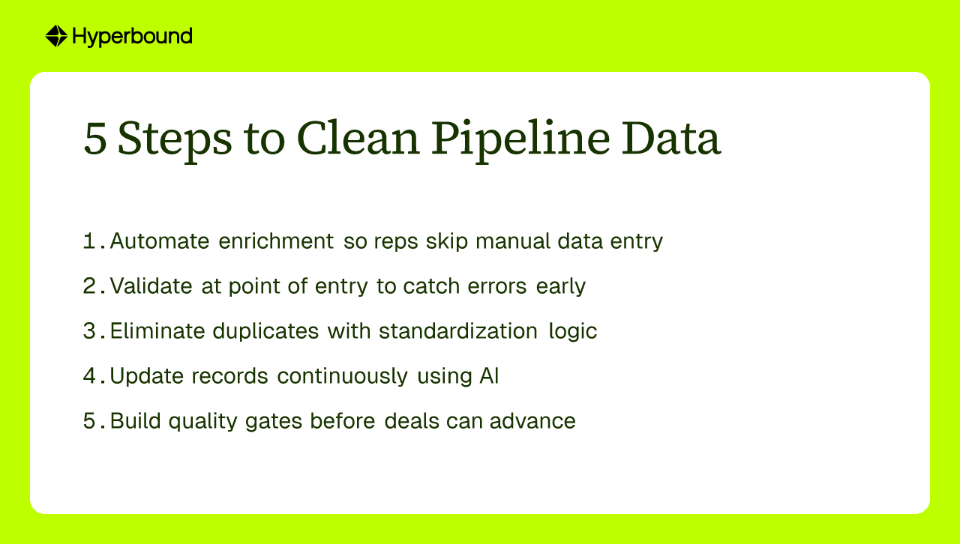
Before any of this works, you have to fix the data problem.
As one practitioner put it: "Everyone's complaining about stale data killing our connect rates." Another framed it more bluntly: "If reps are spending that much time cleaning records, the pipeline is basically asking salespeople to do ops work."
The solution is to remove the human from the data entry process entirely.
Hyperbound Perform's Auto-CRM Fill feature captures data directly from sales conversations — calls, emails, meetings — and writes it into the CRM automatically. What gets recorded is an objective log of what actually happened, not a rep's interpretation entered 48 hours later.
Combined with clean data infrastructure, a systematic approach to data quality means:
These strategies shift data quality from a periodic cleanup task to a continuous operational process. Clean data is not a project. It is a system.
When the CRM reflects reality, automation becomes meaningful. When it does not, you are just querying fiction faster.

With a foundation of clean, automatically captured data, the questions you can ask get much more interesting. Kota Activate provides the infrastructure to query your entire GTM reality, not just the fields your reps remembered to fill in.
Here is how it works across three scenarios every RevOps leader faces.
"Which deals are at risk this quarter?"
The old way: check the Close Date field and ask the rep if it is still accurate.
How Kota works: Kota analyzes the content of sales calls. It surfaces deals where the champion mentioned a budget freeze, a competitor entered the evaluation, or the timeline shifted explicitly. Risk identified from ground truth, not a dropdown. This kind of signal tracking from call data gives RevOps a view of deal health that no CRM field can provide.
"Which reps have deals without a stakeholder meeting in the last 14 days?"
The old way: a manager manually scans calendars or polls each rep in the weekly review.
How Kota works: Kota connects calendar and CRM data. It proactively flags late-stage deals missing a critical upcoming touchpoint, like a meeting with the economic buyer. Deals losing momentum get surfaced before they go dark, not after the quarter closes.
"What patterns do we see in last quarter's losses?"
The old way: pull the Closed-Lost Reason field and try to read meaning into whatever the rep typed.
How Kota works: Kota runs cross-deal analysis across call transcripts and CRM records. It can identify patterns like: deals where a specific competitor was named after the pricing stage closed at a significantly lower rate, or deals that skipped an implementation discussion in the final two calls showed higher early churn. That is strategic insight the GTM team can act on immediately.
None of these queries require a meeting. All of them replace one.
When the data is trusted and current, the entire tone of the pipeline conversation changes.
Traditional reviews are interrogations. Managers ask if the forecast is real. Reps defend their numbers. The conversation circles around what was entered, not what is actually happening. Everyone leaves having generated more questions than they arrived with.
When pipeline data is live and objective, the conversation becomes diagnostic. The manager and the rep look at the same ground truth and ask: "The data shows this deal has had no engagement with the finance persona in three weeks. How do we get a meeting on the books?" That is a different conversation. It is collaborative. It is forward-looking. It is productive.
The business impact of this shift is measurable. One software company that moved to this operational model improved sales forecast accuracy by 26% and saved over 3,000 person-hours annually. That is not a minor efficiency gain. That is a structural improvement in how the revenue organization operates.
Over time, this builds something more durable than a process. MIT Sloan Review research on data-driven cultures shows that organizations where decisions are grounded in shared, trusted data develop stronger alignment across functions, which is foundational to scaling RevOps effectively.
The goal is not a more efficient pipeline meeting. The goal is to build a GTM infrastructure that makes the weekly review meeting unnecessary.
When your pipeline data is live, captured automatically from real conversations, and queryable on demand in Slack, the review becomes a continuous asynchronous process. Problems surface the day they emerge, not seven days later on a Tuesday call. Managers ask questions when they have them, not when the next meeting slot opens up.
The best pipeline review is the one nobody has to schedule.
If your team is still running weekly review ceremonies off manually updated CRM fields, that is the process worth replacing first. See how Kota Activate provides the query layer your GTM team needs.
Pipeline review automation is a system that allows sales leaders to ask critical questions about their pipeline on demand and get immediate, data-backed answers, typically within a tool like Slack. It replaces static weekly reports with a real-time query layer, transforming pipeline management from a scheduled, reactive meeting into a continuous, proactive process.
Traditional pipeline reviews are ineffective because they are built on lagging indicators and depend on manually entered CRM data that is often incomplete or outdated. By the time a problem appears in a weekly report, the deal has likely already stalled, making the review a retrospective exercise rather than a proactive one.
Automation addresses bad CRM data at its source by capturing information directly from sales conversations—like calls, emails, and meetings—and writing it to the CRM automatically. This eliminates manual data entry, ensuring the CRM reflects an objective log of events. Clean data is the essential foundation for any meaningful pipeline automation.
The primary benefits are improved sales forecast accuracy, significant time savings by eliminating unnecessary meetings, and the ability to surface deal risks proactively rather than reactively. This shifts conversations from defensive data interrogations to collaborative, forward-looking strategy sessions.
Yes, pipeline automation excels at identifying at-risk deals much sooner than manual reviews by analyzing real-time activity and conversation data. It can automatically flag an opportunity that is missing a key stakeholder meeting or surface deals where a prospect mentioned a budget freeze, allowing managers to intervene immediately.
Pipeline automation transforms a sales manager's role from a CRM data inspector into a strategic coach. With trusted, real-time data and alerts, managers can stop interrogating reps about their numbers and instead focus their time on diagnosing issues and coaching their team on how to win deals.
The first and most critical step is to fix the data quality problem by ensuring your CRM data is clean, accurate, and automatically updated. You cannot automate a review process on unreliable data. Once your CRM reflects reality, you can then add a query layer to enable on-demand, asynchronous pipeline analysis.











Use Cases
Legal