
Every guide on LinkedIn buyer personas gives you the same advice: search for your ICP, read their profile, take notes, build a slide deck. Repeat.
What almost none of them tell you is that LinkedIn isn't just a research library — it's the best proving ground you have for practicing against the buyers you're about to call.
That gap is expensive. Sales reps consistently struggle with maintaining the flow of conversations and identifying the right product angle mid-call, and the root cause is rarely laziness — it's lack of reps against realistic buyers. Meanwhile, conducting customer interviews to build accurate personas is notoriously hard to pull off at scale. Most reps end up walking into deals with a persona built on assumptions, hoping the live call fills in the blanks.
This guide is about collapsing that gap. You'll walk away with a three-act framework for extracting deep buyer signals from LinkedIn, translating those signals into a practice-ready AI persona, and running targeted roleplays before the first real conversation ever happens.
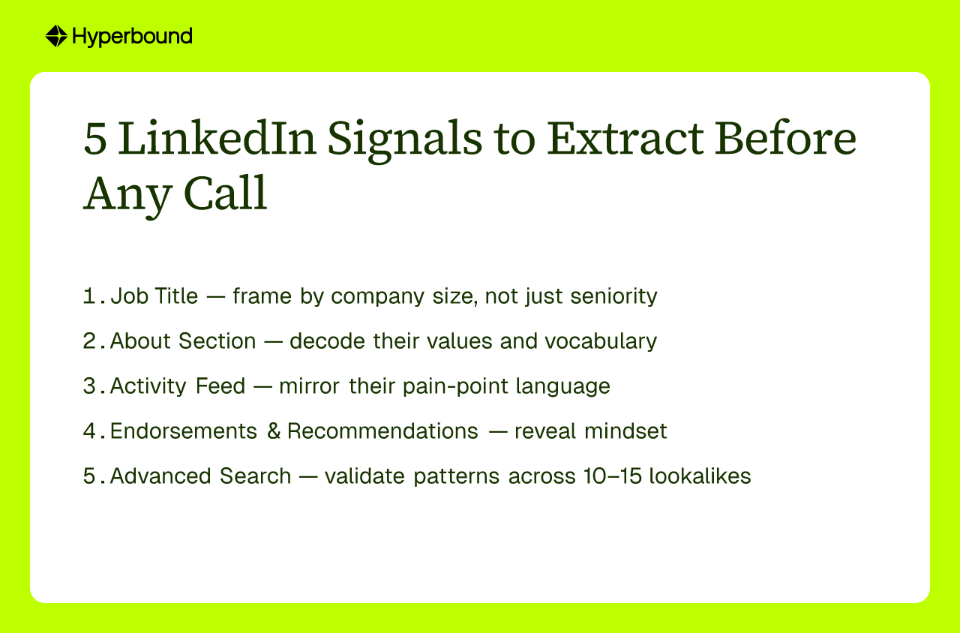
Most reps spend 30 seconds on a LinkedIn profile before sending an outreach message. That's a missed opportunity. A well-read profile is a goldmine of qualitative data — the kind you can't pull from a CRM field.
Here's how to go deeper.
Yes, note the title, tenure, and company size. But treat those as table stakes. A "Director of Revenue Operations" at a 50-person SaaS startup has a fundamentally different day, budget, and set of anxieties than the same title at a 2,000-person enterprise. While demographics and firmographics give you a starting frame, the real signal is in everything else.
This is where buyers self-select their priorities. Look for:
Scroll through their recent posts and comments. Ask yourself:
Analyzing the language a buyer uses publicly is one of the most underused tactics in building accurate buyer personas, yet it's sitting right there in the feed.
Skills endorsements tell you what others think this person is good at. But look at who is endorsing them. A VP endorsing a manager's "cross-functional leadership" signals organizational visibility. An engineer endorsing someone for "process improvement" suggests an efficiency-first mindset.
Recommendations they've written for others are even more revealing. What someone praises in a colleague is a window into their own values. Someone who writes "she was always data-driven and never made decisions on gut instinct" is telling you exactly how to speak to them.
Once you've built a clear picture from one or two profiles, use LinkedIn's Advanced Search or Sales Navigator to find 10–15 similar profiles. Look for patterns: Do most of them share certain skills? Engage with the same thought leaders? Use the same language in their bios?
This cross-referencing—from analyzing bios to endorsements to finding lookalikes with advanced search—is how you move from a hunch to a validated hypothesis about your buyer, all without a single customer interview.
You've done the research. You've got notes on their language, their priorities, their career history, and their likely objections. Now what?
This is where most persona projects die. The insights get filed into a static PDF or a slide in a deck nobody opens before a call. The qualitative data you worked hard to gather isn't easily accessible when you actually need it.
The fix is to turn your research into something you can talk to.
Hyperbound's LinkedIn Chrome Extension is built specifically for this moment. Instead of manually transferring your research notes into a training scenario, you activate it directly on the LinkedIn profile you've been analyzing.
Here's how it works:
What you get isn't a chatbot reading back the LinkedIn bio. It's a simulated buyer that thinks, responds, and objects the way a real person in that role would — grounded in both the specific profile data and real-world sales call behavior from thousands of similar deals.
This solves the core problem: you no longer need to schedule customer interviews or guess at how your buyer will react. You have a realistic proxy that's ready to practice against in seconds.
Here's an uncomfortable truth: your first live call with a prospect is still a practice run — the question is whether your prospect is the one paying for it.
Account executives consistently cite "not enough at-bats" as a reason their skills decay, especially in low-volume periods. The answer isn't more calls with real leads. It's structured LinkedIn buyer persona practice in a zero-risk environment before those calls happen.
With your AI buyer persona built, you can run full simulations across every stage of the conversation:
After each simulated call, Hyperbound's AI Scorecards give you instant, objective feedback: talk ratio, question rate, key selling moments hit or missed, and specific coaching cues. You don't wait for manager availability or a scheduled call review.
This matters because frontline managers spend less than 8% of their time coaching — the feedback loop between a bad call and corrective coaching can stretch weeks. With AI coaching built into every rep, that lag disappears. You identify the gap, fix it, and practice again — before the next real call.
For senior reps who don't need hour-long generic training, Bitesized Roleplays are the answer. If you have a call in 20 minutes with a CFO who's going to push back on ROI, you run a 5-minute targeted drill on that exact objection. No full-length session required — just sharp, contextual prep right before the conversation that counts.
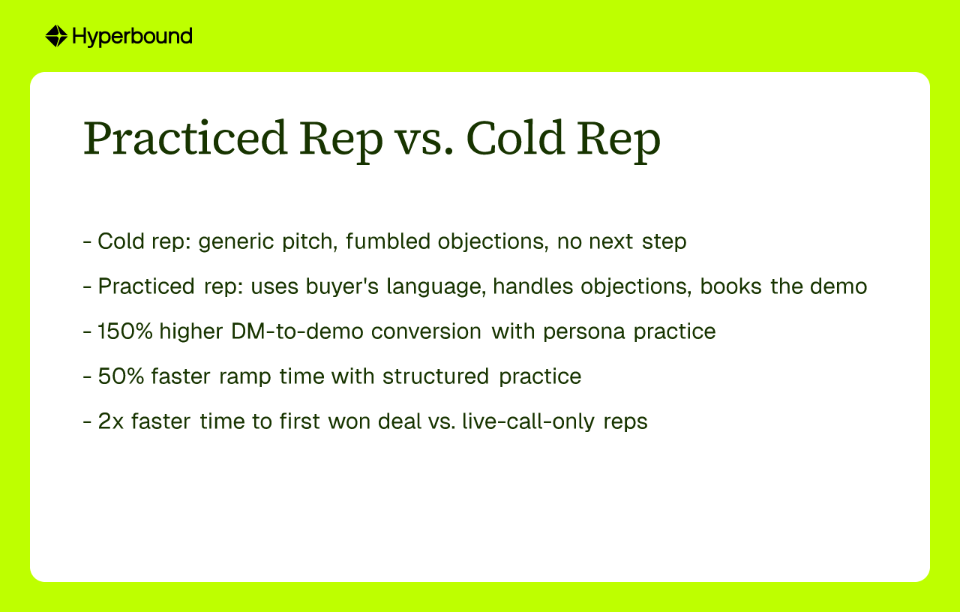
Let's make this concrete. Two reps. Same prospect. Same product. Very different outcomes.
The rep who goes in cold: They spend 30 seconds on the LinkedIn profile, note the job title, and send a templated outreach message. On the call, they lead with a generic pitch. When the buyer pushes back with an unexpected objection, they fumble. The conversation loses momentum. The meeting ends without a clear next step.
The rep who runs LinkedIn buyer persona practice: They spend 15 minutes on the profile using the framework in Act 1. They activate Hyperbound's Chrome Extension, generate an AI persona, and run two quick roleplay drills — one on the opener, one on the objection they know is coming based on the buyer's activity feed. They walk into the call with a hypothesis about the buyer's top priorities. They use the buyer's own language. When the objection lands, they've already handled it three times. They book the demo.
This isn't a hypothetical. The data backs it up:
(Source: Hyperbound Approved Proof Points)
Companies using detailed buyer personas generate 73% higher conversion rates — and that number climbs further when those personas aren't just documented, but actively practiced against.
The three-act framework in this guide isn't complicated. It's a process:
A LinkedIn buyer persona is a detailed profile of your ideal customer built from analyzing their LinkedIn profile. It goes beyond demographics to capture their professional vocabulary, priorities, values, and likely pain points. The goal is to use these deep insights to create a highly tailored sales approach and, with tools like Hyperbound, even simulate practice conversations.
You create a buyer persona from LinkedIn by analyzing five key signals: 1) Job Title in the context of company size, 2) the "About" section for their self-described values and vocabulary, 3) the "Activity" feed for their top-of-mind pain points, 4) "Endorsements & Recommendations" to understand their mindset, and 5) Advanced Search to validate patterns across similar profiles.
Practicing with an AI buyer persona is often better than traditional roleplay because it is scalable, consistent, and available on-demand. Unlike peer roleplay, which depends on a colleague's availability and subjective interpretation, an AI persona provides a zero-risk environment where you can practice against a realistic, data-driven buyer multiple times, receive instant, objective feedback, and sharpen skills right before a live call.
The most valuable signals on a LinkedIn profile are qualitative data points that reveal a buyer's mindset. Key signals include the specific language they use in their "About" section, the topics and posts they engage with in their "Activity" feed, the skills their colleagues endorse them for, and the values they highlight in recommendations they've written for others.
AI sales roleplays improve call performance by providing a safe, realistic environment for deliberate practice. Reps can test openers, rehearse discovery questions using the buyer's actual language, and master handling specific objections. With instant AI feedback after every simulation, they can identify and close skill gaps much faster than with traditional coaching, leading to more confident and effective live calls.
If a prospect's LinkedIn profile is sparse, use LinkedIn's advanced search or Sales Navigator to find 10-15 "lookalike" profiles—people with similar titles at similar companies. By analyzing these profiles for common patterns in language, skills, and activity, you can build a composite, high-confidence persona that accurately represents your target buyer, even when the primary profile lacks detail.
The goal isn't perfection — it's to ensure your first live call isn't also your first practice run. Your prospects are too valuable for that, and your pipeline can't afford it.
Ready to stop going in cold? Try Hyperbound's AI roleplays with pre-built buyer personas and see what a practiced first conversation feels like.









Use Cases
Legal