Introducing the Hyperbound Plugin for ChatGPT: Turn Real Sales Calls into Targeted Practice

11
min read

11
min read
Install Hyperbound from the ChatGPT directory, find the moments that matter in your calls, and draft roleplays, scorecards, and learning modules in the same conversation. Already on Claude or another MCP-compatible tool? Hyperbound works there too.
Picture this.
For your sales team, ChatGPT is where the day happens. Reps prep for calls there. Managers draft follow-ups, summarize accounts, and pressure-test deal strategy there. When someone has a question, the first move isn't opening five tabs. It's opening a chat.
So when a coaching problem shows up, that's where you start too.
It's Monday pipeline review. Third deal in a row, and the rep says it again: "They loved the demo, but pricing came back high."
You've heard it on a call last week. And the week before. You're now fairly sure buyers are saying the same thing, and your reps are answering it five different ways. At least two of those ways involve the word "flexible" and a long pause.
You know exactly what needs to happen. The team should practice this objection, using what buyers actually said.
So you write it on your to-do list. Right under "build that discovery scorecard" from last quarter.
Because between "we should practice this" and an actual practice session, there's a scavenger hunt. And most of it happens outside the place your team actually works. Leave ChatGPT to find the calls. Scrub through recordings for the moments. Copy what buyers said back into a chat. Draft a scenario, then paste it into your training platform. Each step is reasonable. Together, they're a Thursday afternoon you don't have.
The Hyperbound plugin for ChatGPT brings your calls, scorecards, and training into the workspace your team already lives in. The scavenger hunt becomes a few questions.
Most managers don't lack coaching ideas. They lack the hours to turn those ideas into something a rep can practice.
Here's what usually stands between spotting a pattern and doing something about it.
Every handoff is small. But each one is another place for the idea to stall. By the time the practice session exists, the objection has cost you two more deals, and the moment has passed.
The same thing happens in enablement. A team refreshing its discovery playbook knows the behaviors it wants to coach. Turning those into an updated scorecard still means starting from a blank page, or from an old one nobody wants to edit.
You can't coach on a pattern faster than you can get to the evidence.
"Every sales manager knows the moment. You hear the same objection on three calls, and you know exactly what your team needs to practice. The hard part has always been getting from that insight to a practice session. Our customers already run their day in ChatGPT, so we're meeting them there. The calls, the evidence, and the first draft of the training are now one question away, and nothing goes live until a manager signs off."
— Atul Raghunathan, CEO, Hyperbound
Quick context if you're new here: Hyperbound is an AI sales coaching platform. Teams use it to practice with realistic AI roleplays, and to score and analyze their real sales calls so reps and managers can see what's working.
Hyperbound is built on the Model Context Protocol (MCP), an open standard that lets AI tools connect securely to the systems where your data lives. So your sales data isn't tied to one assistant. Teams already connect Hyperbound to Claude and other MCP-compatible tools (here's how).
What's new: if your team works in ChatGPT, you can now install the Hyperbound plugin directly from the ChatGPT directory.
“ChatGPT is more useful at work when people can connect it to the tools and information they already rely on. The Hyperbound plugin brings that to sales teams: reps can draw on real customer conversations to prepare for their next call, and managers can use those same conversations to create targeted coaching and practice. By making Hyperbound available in the ChatGPT directory, we’re giving sales teams a way to put what they learn from one conversation to work in the next.”
— Arpan Shah, GM of Technology Vertical, OpenAI
ChatGPT is great at reasoning, drafting, and working through a problem with you. What it doesn't know on its own is what your buyers said on Tuesday's discovery call.
That context lives in your sales conversations: the objections buyers raise, the competitors they mention, the questions your best reps ask. Hyperbound already captures and scores those conversations. The plugin makes that context available in ChatGPT, so the answer to "what should my team practice?" comes from your own calls, not a generic best practice.
Once your team connects its Hyperbound account, here's what the workflow looks like:
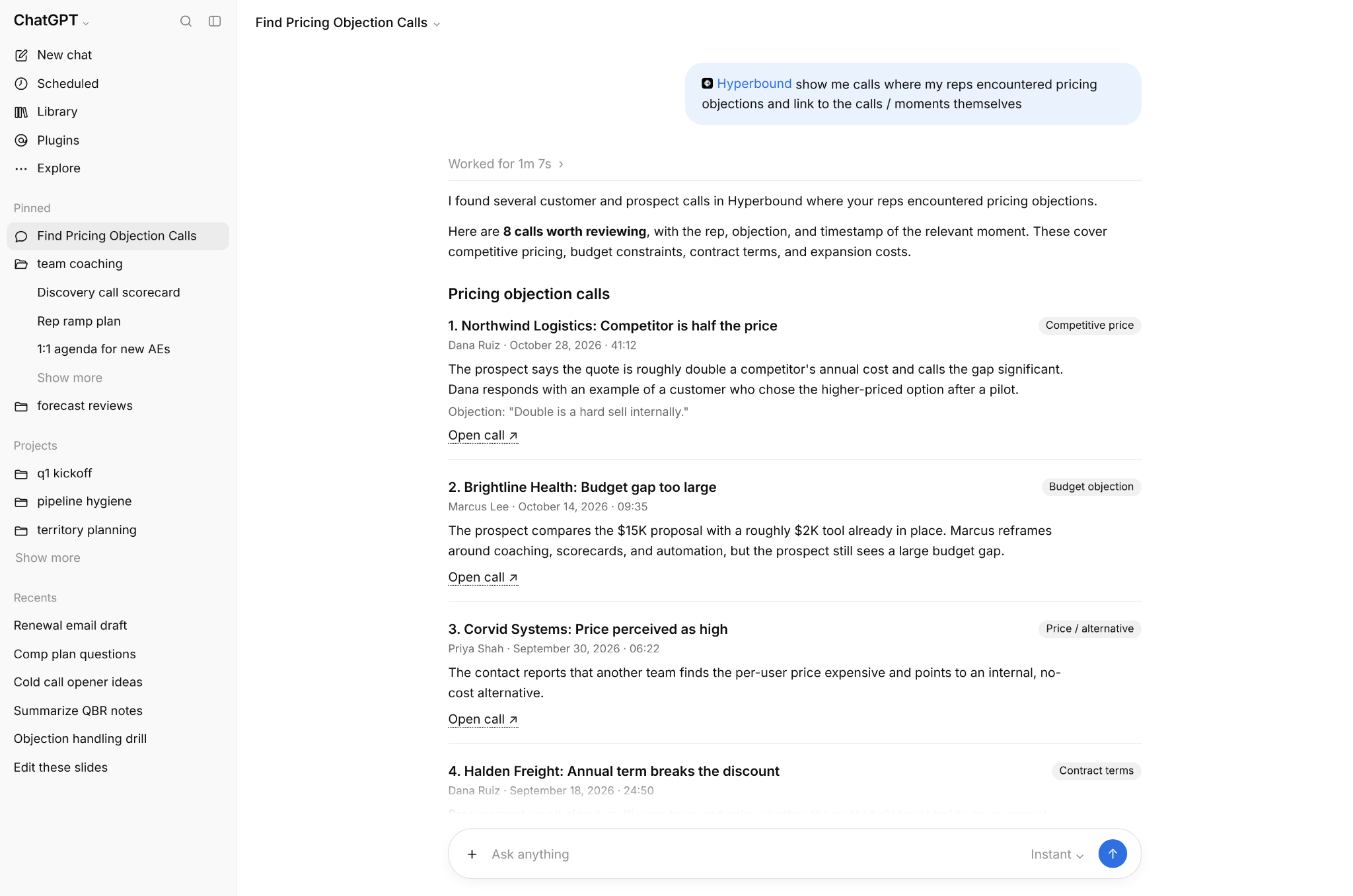
Deeper analysis can take 30 seconds to 2 minutes. That's Hyperbound working through your data, not ChatGPT making it up.
Drafting is easy to undo. Assigning training to forty reps is not. So the plugin is built around review:
ChatGPT helps you get to a first draft faster. You still decide what your team practices.
Who: A sales manager coaching objection handling.
Buyers keep pushing back on pricing, and the manager wants to coach from real examples, not a made-up scenario.
In ChatGPT, they ask Hyperbound to find calls where buyers raised pricing objections. They review the evidence, then ask for a roleplay draft based on the objection that keeps coming up, and open it in Hyperbound.
What changes: The next practice session starts with what buyers actually said. Reps rehearse against the real objection, in the buyer's real words.
Who: A sales enablement leader updating discovery training.
The team is refreshing its discovery playbook and needs a scorecard that reflects the behaviors managers want to coach.
They find the existing discovery scorecard, then ask for a draft that reflects the new criteria. The draft opens in Hyperbound for review.
What changes: Enablement starts from the training assets it already has, and reviews the proposed changes before rolling anything out. No blank page, no copy-pasting old criteria into a new doc.
Who: An enablement leader building training on a topic reps keep fumbling.
Some gaps need more than a single exercise. They need context, examples, and practice in one place.
They ask Hyperbound to pull relevant calls, then draft a learning module built around them, and open it in Hyperbound to review.
What changes: Training material is grounded in your own calls, not generic examples from a slide deck.
Who: A frontline manager who suspects a problem but can't name it yet.
Win rates are slipping, and the manager isn't sure whether it's discovery, objections, or something else.
They explore team performance in ChatGPT, follow the pattern down to specific calls, and only then decide what to build.
What changes: Coaching starts from evidence, not a hunch from the last pipeline review.
Asking an AI assistant to write a roleplay isn't new. You could always paste in a description and get something back.
What changes is what that draft is built on, and where it goes next.
The to-do list item doesn't disappear. It just stops waiting until Thursday afternoon.
The Hyperbound plugin is now available in the ChatGPT plugin directory.
Using Claude or another MCP-compatible tool? Connect it with the Hyperbound MCP server.
To connect, you'll need a Hyperbound account with access to at least one active organization.
The next time you hear the same objection three deals in a row, your team can be practicing it by the end of the day.
Already a customer? Talk to your account manager about connecting Hyperbound to ChatGPT.
New to Hyperbound? Learn more about Hyperbound.
Hyperbound is an AI sales coaching platform. Sales teams use it to practice with realistic AI roleplays, and to score and analyze their real sales calls so reps and managers can see what's working. Hyperbound connects to ChatGPT, Claude, and other compatible AI tools through the Model Context Protocol (MCP). Learn more at hyperbound.ai.
Note: Hyperbound is the sole publisher of this announcement. Arpan Shah's statement is included with his express permission, and its inclusion does not imply an endorsement by OpenAI.





Use Cases
Legal