
Your deals are happening in your CRM and call recording tools. But your team lives in Slack.
That gap — right there — is where deal momentum goes to die.
Every time a rep has to leave Slack to dig through a CRM stage update, hunt down a call recording, or cross-reference a stakeholder email, they're paying what's called the context-switch tax. It sounds minor. It isn't. Research consistently shows that switching between tools mid-workflow doesn't just cost seconds — it disrupts the focused attention required to take action, follow up fast, and keep deals moving.
And the problem isn't just rep productivity. It's that deal signals are buried inside CRMs and call recordings while your team is making decisions in Slack. By the time a risk surfaces, it's often too late to course-correct.
So the obvious fix seems to be: push more notifications into Slack. But that's exactly where most teams go wrong.
Reps on Reddit are vocal about it — current Salesforce-Slack integrations leave them frustrated with "cluttered notifications that aren't tailored to specific needs." And ops teams complain that "excessive message volume makes important information hard to find." More noise isn't the answer. More intelligence is.
This article breaks down what deal intelligence in Slack actually means in practice, versus the shallow notification approach most teams settle for — and closes with a concrete framework for building it.
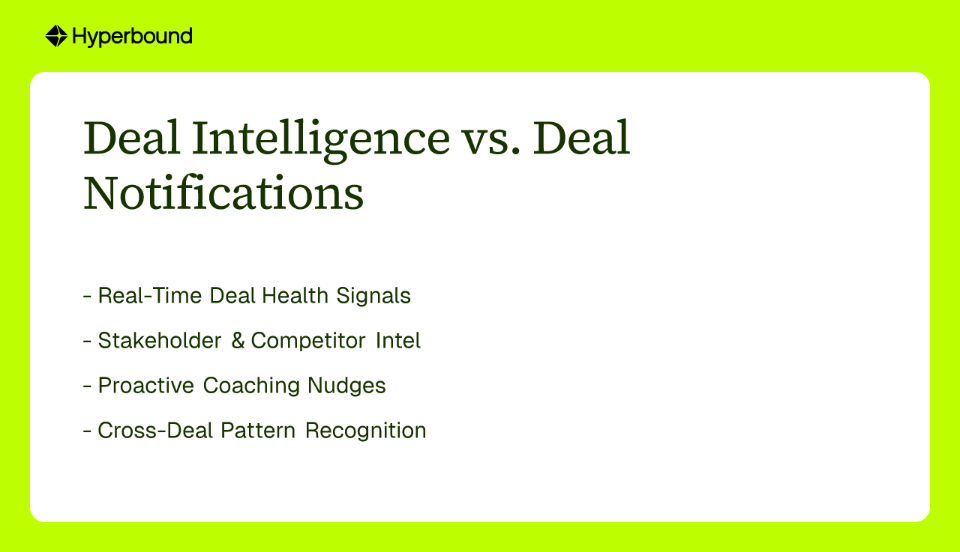
Most Slack integrations today are data dumps. A deal moves to "Proposal." A field gets updated. A stage changes. These are notifications. They tell you something happened. They don't tell you what it means, what's at risk, or what to do next.
True deal intelligence in Slack is different. It's the practice of automatically surfacing real-time, actionable insights about deal health, risks, and opportunities — directly inside the communication platform where your team collaborates and makes decisions.
There are four pillars that separate deal intelligence from deal notifications:
This isn't about tracking CRM field changes. It's about monitoring the behaviors that actually signal risk or momentum — and flagging them before a deal goes cold.
Examples of meaningful signals:
Tools like Hyperbound move beyond surface-level data to surface the early warning signs reps often miss when they're running a full pipeline.
When a competitor gets mentioned on a call, your team needs to know — and they need to know now, not when someone reviews the call transcript three days later.
Effective deal intelligence automatically flags competitor mentions so your team can adjust strategy immediately. It also tracks stakeholder engagement patterns, alerting you when a champion goes quiet or when a new economic buyer enters the conversation.
Frontline managers spend only 5–8% of their time coaching and listen to less than 1% of recorded calls. That's not a discipline problem — it's a scale problem. There's simply too much happening to monitor manually.
The right deal intelligence layer solves this by surfacing coaching nudges at the moment they'll have the most impact: before the next call, not weeks later in a QBR. Think: "This rep has faced pricing objections on their last three calls at this deal stage. Here's the relevant call moment. A quick prep session before Thursday's call could shift the outcome."
This is the insight that no individual rep or manager can generate on their own. It requires looking across your entire pipeline simultaneously.
Examples:
Surfacing these patterns in real time — inside Slack, where your team can act on them — is what separates a reactive sales org from a proactive one.
Understanding the four pillars is one thing. Seeing them implemented is another.
Kota Activate by Hyperbound is the clearest working example of what a true deal intelligence layer looks like inside Slack. It's not a notification bot. It's an AI revenue analyst that sits above two interconnected products — Hyperbound Practice (AI roleplays) and Hyperbound Perform (real call and deal analysis) — and orchestrates them into a single intelligence layer available directly in your Slack workspace.
Here's what makes it different from a standard integration:
It analyzes all deals simultaneously. Rather than giving you a one-deal-at-a-time view, Kota looks across your entire pipeline at once — surfacing cross-deal patterns, recurring objections, and at-risk opportunities in aggregate. Managers can ask plain-English questions directly in Slack like "Which deals are at risk of slipping this quarter?" or "Show me all deals where a competitor was mentioned in the last two weeks" and get answers grounded in real conversation data.
It references closed-won and closed-lost patterns. Kota doesn't just report on what's happening now — it benchmarks current deals against historical patterns from past wins and losses. This means coaching recommendations aren't generic; they're tied to what has actually worked in your specific sales environment.
It recommends and takes action. This is the part most tools skip. When Kota surfaces a risk — say, a rep consistently struggling with discovery calls at a specific deal stage — it doesn't just flag it. It can generate a targeted, bite-sized AI roleplay for that rep to practice that exact scenario before their next call. Critically, this happens inside Slack, which means enablement stops feeling like "homework that gets ignored when month-end pressure hits" and starts feeling like a timely, relevant resource.
Hyperbound's Perform product powers the deal-level data underneath Kota — pulling insights across all calls in a deal lifecycle, not just individual conversations. While traditional conversation intelligence tools give you a rich library of call data, Kota closes the gap between that data and action: it turns signal into coached behavior, and coached behavior into closed revenue.
Hyperbound calls this Revenue Activation — the moment teams stop just analyzing data and start actually using it to change deal outcomes.

Whether you're using a platform like Hyperbound or assembling your own stack, here's the four-step framework for building deal intelligence in Slack that actually drives action.
Intelligence requires input. Before you can surface insights, you need your core systems talking to each other:
Connecting these three creates the foundation. Without conversation data specifically, you're limited to CRM fields — which are only as accurate as the rep who last updated them.
Move beyond "stage changed." Your triggers should be behavior-based and tied to events that actually signal deal risk or deal momentum.
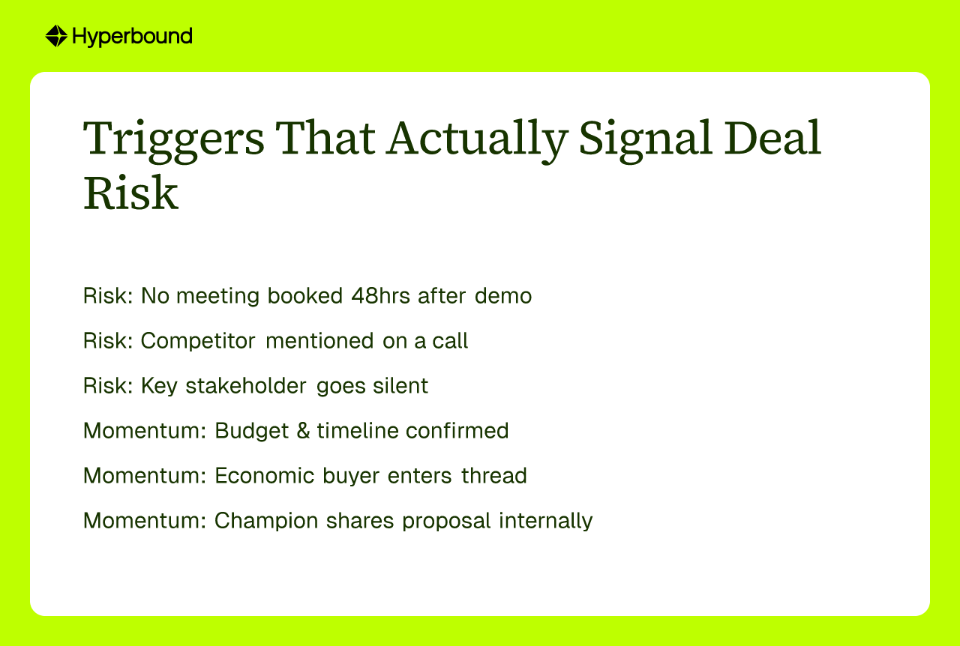
Risk Triggers:
Momentum Triggers:
The goal is for every trigger to prompt a specific action — not just awareness.
This is where most integrations break down. Users consistently report that current notifications lack context, feel cluttered, and don't drive clear next steps. The fix is structuring every notification around four elements: Signal → Insight → Recommended Action → Link.
Here's what that looks like in practice:
❌ Bad Notification:
DEAL UPDATE: Opportunity "Global Tech Inc" — Stage changed to Proposal.
✅ High-Functioning Deal Intelligence Notification:
🟢 DEAL MOMENTUM: Global Tech Inc — Proposal Stage
Signal: @JaneDoe confirmed budget and timeline on today's discovery call.
Insight: Based on closed-won patterns, deals that include a 1-page security compliance summary with the proposal at this stage win 22% more often.
Recommended Action: @JaneDoe, use the "Security First Proposal" template. @SalesManager, review before EOD.
[View Deal in Salesforce →]
The difference isn't cosmetic. The first notification informs. The second one activates.
The final step is closing the loop from insight to action automatically — without requiring a manager to manually translate every signal into a coaching conversation.
For most sales teams, this is where a platform like Kota Activate earns its place in the stack. It handles the analysis, pattern recognition, and action-taking — including generating deal-specific AI roleplays — without requiring engineering resources.
The goal of full orchestration is simple: when a risk signal fires in your pipeline, the right person gets the right nudge in Slack, with a clear next step attached, before the deal has a chance to slip.
The gap between where deal signals live and where your team works is costing you revenue — and it's measurable in the form of delayed follow-ups, missed coaching moments, and deals that drift quietly into "closed-lost."
Closing that gap isn't about sending more notifications into Slack. It's about building an intelligence layer that turns raw deal data into coached behaviors and coached behaviors into closed revenue.
A high-functioning deal intelligence setup gives your team real-time visibility into deal health, surfaces cross-deal patterns your managers can't see manually, and delivers coaching nudges at the exact moment they can change an outcome — all inside the platform where your team already works.
Stop letting deal momentum die in the context-switch tax. Whether you're building this from scratch or evaluating a platform purpose-built for it, the framework above is your starting point.
Deal intelligence in Slack is the practice of automatically surfacing real-time, actionable insights about deal health, risks, and opportunities directly within your team's Slack workspace. Unlike basic notifications that just report a CRM field change, deal intelligence analyzes data from your CRM and call recordings to provide context, identify patterns, and recommend next steps, helping your team make faster, more informed decisions.
Deal intelligence provides actionable insights, while regular notifications simply report that an event has occurred. For example, a standard notification might say a deal stage has changed. A deal intelligence alert would add context, such as, "This deal moved to proposal, and based on past wins, including a security summary at this stage increases the win rate by 22%." It focuses on the meaning of the data and recommends a specific action.
Context switching is a problem because it disrupts focus and costs valuable time, which slows down deal momentum and reduces productivity. Every time a sales rep has to leave their primary communication tool like Slack to search for information in a CRM or call recording tool, they pay a "context-switch tax." This small interruption breaks their workflow, delays follow-ups, and can cause critical deal signals to be missed.
A deal intelligence system is built on four key pillars: real-time deal health signals, stakeholder and competitor intelligence, proactive coaching nudges, and cross-deal pattern recognition. To function, this system requires connecting your core data sources (CRM, conversation intelligence, and Slack), defining intelligent, behavior-based triggers, and designing notifications that provide a clear signal, insight, and recommended next action.
Deal intelligence helps sales coaching by automatically identifying coachable moments from call data and delivering timely, specific nudges to reps and managers directly in Slack. Since most managers lack the time to review every call, an intelligence layer can flag when a rep is struggling with a specific objection across multiple deals and recommend a targeted coaching action, ensuring coaching happens proactively when it can still impact a deal.
Revenue Activation is the process of turning deal signals and data insights into concrete actions that directly influence and improve deal outcomes. It represents the shift from passively analyzing sales data to actively using that intelligence to change seller behavior in real time. For example, it closes the loop between insight and action by automatically triggering a coaching exercise when a deal risk is identified.










Use Cases
Legal