
Are you frustrated with the amount of time you spend on prospect research before each call? In today's hyper-competitive sales landscape, efficiency isn't just nice to have—it's essential for survival. As we move further into 2025, the most successful sales professionals aren't just the hardest workers, but the smartest ones—leveraging technology to automate mundane tasks and AI to continuously sharpen their skills.
Chrome extensions have evolved from simple browser add-ons to powerful sales enablement tools that transform your browser into a command center for prospecting, research, and engagement. This guide will walk you through the 10 essential Chrome extensions you need in 2025, complete with setup guides and a clear analysis of their return on investment.
In a multi-channel world, having direct phone numbers and verified emails is non-negotiable. Kaspr delivers this crucial information instantly.
Key Features:
Specific Use Case: You're viewing a key decision-maker's profile on LinkedIn Sales Navigator. With one click on the Kaspr widget, you retrieve their direct dial number and verified work email, then send it straight to your HubSpot CRM without leaving the page.
Setup & Best Practices: Install from the Chrome Web Store. Connect your LinkedIn account and integrate with your CRM. Use it as the second step in your prospecting workflow: first identify leads with Sales Nav, then use Kaspr to get their contact details.
ROI & Impact: Drastically reduces time spent on manual prospect research for contact info. Increases connection rates for cold calling campaigns. G2 Rating: ⭐ 4.4/5.
Apollo.io combines a massive B2B database with engagement tools, reducing the need for multiple separate subscriptions.
Key Features:
Specific Use Case: You identify a target company. Using the Apollo.io extension, you can see all employees, filter by job title to build an org chart, identify key decision-makers, find their contact info, and enroll them in an automated email sequence directly from the extension.
Setup & Best Practices: Install and connect to your LinkedIn and email accounts. Define your Ideal Customer Profile (ICP) within Apollo to leverage its intent data and lead scoring effectively.
ROI & Impact: Consolidates your tech stack, saving money and improving workflow. Prioritizes leads effectively, ensuring you focus on prospects most likely to convert. G2 Rating: ⭐ 4.7/5.
Email remains a core sales channel. This tool adds critical functionality missing from standard Gmail, automating follow-ups and providing key insights.
Key Features:
Specific Use Case: You send a proposal to a prospect. With Right Inbox, you get a notification the moment they open it, allowing you to follow up with a perfectly timed phone call. If they don't reply in 3 days, an automated follow-up is sent without you lifting a finger.
Setup & Best Practices: Install from the Chrome Web Store and grant Gmail permissions. Create templates for each stage of your sales process (initial outreach, proposal, follow-up) to maximize efficiency.
ROI & Impact: Saves hours per week on email management, prevents leads from falling through the cracks, and provides data to understand prospect engagement.
Video messages cut through the noise of text-based emails, creating a more human connection and increasing response rates.
Key Features:
Specific Use Case: Instead of a long follow-up email, you record a 60-second Vidyard video. You start with their LinkedIn profile on screen to show you've done your prospect research, then switch to your webcam to deliver a personal message summarizing the key value points for them.
Setup & Best Practices: Install the extension and connect it to your Gmail. Keep videos short (under 90 seconds) and use an engaging thumbnail (a whiteboard with their name works well).
ROI & Impact: Significantly boosts email reply rates and helps build rapport before the first meeting.
Personalization goes beyond [First Name]. Crystal uses AI to analyze public data and predict a prospect's personality, helping you tailor your communication style.
Key Features:
Specific Use Case: You're about to email a C-level executive. Crystal's extension on their LinkedIn profile tells you they are a "High-D" (Dominant) personality. The advice is to be direct, focus on results, and skip the small talk. You rewrite your email to be concise and data-driven, increasing your chance of a response.
Setup & Best Practices: Install the extension and use it to analyze key stakeholders' LinkedIn profiles before any outreach.
ROI & Impact: Improves communication effectiveness, builds rapport faster, and helps navigate complex buying committees by understanding different personalities.

Kondo transforms LinkedIn into a supercharged sales platform with AI-powered insights and automation.
Key Features:
Specific Use Case: You identify a list of ideal prospects on LinkedIn. Kondo helps you craft personalized connection requests based on their profile data, schedules follow-up messages, and maintains continuous engagement without manual intervention.
Setup & Best Practices: Install the extension, connect it to your LinkedIn account, and create a custom outreach sequence. Be sure to add personalization tokens to your messages and set a reasonable daily connection limit to stay within LinkedIn's allowlist guidelines.
ROI & Impact: Automates the labor-intensive process of LinkedIn outreach while maintaining personalization, significantly increasing connection acceptance rates and initial conversations.
Clay automates the deep prospect research that used to take hours, allowing for personalization at a scale never before possible.
Key Features:
Specific Use Case: You have a list of 100 target accounts. You can use Clay to run an AI prompt like, "Find the most recent funding announcement for this company and summarize its primary goal." The output can then be inserted as a personalized first line in your cold email campaign.
Setup & Best Practices: Start with a simple data enrichment task, like finding company headcounts for a list of domains. Gradually build more complex "waterfall" enrichments that chain multiple data sources together.
ROI & Impact: Enables true 1-to-1 personalization at scale, leading to dramatically higher reply rates and more meaningful conversations. Saves countless hours of manual research.
Truva tackles one of the biggest complaints of any sales rep: manual CRM data entry. It works in the background to keep your pipeline up-to-date.
Key Features:
Specific Use Case: After you finish a Zoom demo, Truva automatically logs the activity in Salesforce, attaches the call summary, and creates a follow-up task, all without you ever needing to open your CRM.
Setup & Best Practices: Connect Truva to your CRM, email, and calendar. Customize the data extraction rules to match your team's specific fields and processes.
ROI & Impact: Frees up significant administrative time, improves CRM data hygiene, and provides managers with a more accurate view of the sales pipeline. Truva claims it can increase efficiency by up to 25%.
These tools work best together as part of an integrated workflow. Here's how to combine them for maximum impact:
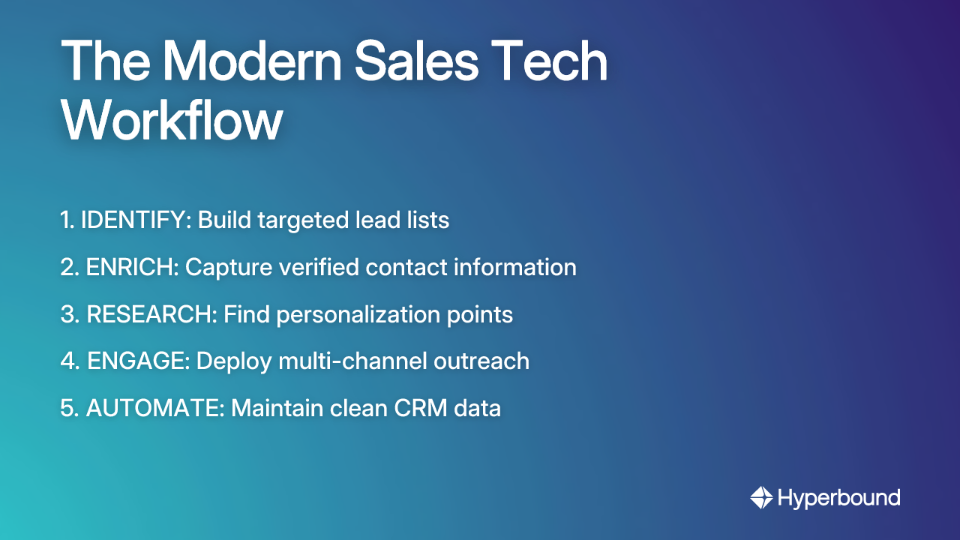
However, having the best tech stack is only part of the equation. The most effective reps also continuously refine their skills. This is where AI-powered sales coaching platforms like Hyperbound come in. While the tools above help you get in front of the right prospects with the right information, Hyperbound ensures your team has the skills to convert those opportunities. By analyzing winning behaviors and providing AI roleplays, it helps reps master their talk tracks, handle objections, and perfect their pitch—making the entire tech stack more valuable.
By automating prospect research, streamlining workflow automation, and personalizing outreach at scale, you free yourself to focus on what truly matters: building relationships and closing deals. The best part? Most of these tools offer free trials or freemium versions, allowing you to test their impact on your budget and sales process before committing to a paid plan.
What Chrome extension can't you live without in your sales process? Share your experience in the comments below!

The most essential Chrome extensions for sales reps fall into five key categories: prospecting and identification, contact data enrichment, AI-powered research, multi-channel engagement, and CRM automation. Building a tech stack with tools from each category—such as LinkedIn Sales Navigator for identifying leads, Kaspr for enriching their contact data, and Truva for automating CRM entry—creates a seamless and efficient workflow.
Chrome extensions can dramatically speed up B2B prospect research by automating the collection of crucial information directly from a prospect's LinkedIn profile or company website. Tools like Apollo.io can provide contact details and company firmographics, while AI-powered extensions like Clay can find unique personalization points, such as recent company news or funding announcements, in seconds.
For finding accurate B2B contact information like direct-dial phone numbers and verified emails, tools like Kaspr, Apollo.io, and Cognism are industry leaders. The "best" choice depends on your needs: Kaspr excels at quickly pulling data from LinkedIn, Apollo.io offers an all-in-one platform with a massive database, and Cognism provides premium, human-verified data with a strong focus on global compliance.
Yes, there is a risk if automation tools are used irresponsibly. However, modern tools like Kondo are designed to mitigate this risk by mimicking human behavior and operating within LinkedIn's recommended usage limits. The key is to focus on quality over quantity, always personalize your outreach, and avoid spammy tactics to ensure your account remains in good standing.
You can create hyper-personalized outreach by combining tools for research and communication. For example, use Clay to run an AI search for a prospect's recent podcast appearance or a company's strategic goals. Then, use Crystal to analyze their personality profile and tailor your email's tone—whether it should be data-driven and direct or more collaborative and friendly—to increase your chances of getting a reply.
The primary benefit of using a video messaging tool like Vidyard is to cut through the noise of text-based inboxes, create a genuine human connection, and significantly increase email engagement and reply rates. A short, personal video where you share your screen or speak directly to the prospect is far more memorable and effective at building rapport than a standard email.
You can eliminate most manual CRM data entry by using an automation tool like Truva. It works invisibly in the background to automatically log your sales activities, emails, and meetings from your calendar and inbox directly into your CRM. This not only saves hours of administrative work but also improves data hygiene and provides a more accurate view of your sales pipeline.










Use Cases
Legal