
You've just wrapped a discovery call. The prospect shared their budget, named three competitors they're evaluating, flagged a hard deadline, and hinted at internal politics slowing the deal. Now you're staring at a blank CRM record — and that post-call adrenaline is already fading into the dread of data entry.
Sound familiar? You're not alone. Sales reps spend 5+ hours per week on manual CRM updates — time stolen directly from selling. And the problem isn't just lost hours. According to research on CRM call transcript analysis, a typical 30-minute sales call generates around 4,500 words of conversation, but reps capture only 40% of actionable intelligence from those calls. The rest? Gone. The downstream effect is brutal: incomplete records, stale pipeline data, and forecast accuracy that swings as wide as ±22%.
Sales leaders in online communities put it bluntly: "80% of our CRM data is incomplete or wrong" and "Context switching… it kills productivity." (Source) Even teams that have tried AI tools find that "most AI CRM automation tools still stop at summaries, which is why legacy AI note-takers feel like busywork instead of time savers." (Source)
Here's where it gets interesting: CRM auto fill AI in 2026 has finally matured past the "meeting summarizer" phase. The best tools now parse calls, emails, and web signals to update structured CRM fields, identify deal risk signals, and — in the most advanced cases — tell you exactly what to do with the data they've captured.
This guide breaks down the 7 best CRM auto fill AI tools for sales teams in 2026, organized by what they actually do with your data — so you can make a smart choice, not just a safe one.
Primary data source: Real sales call recordings (via native Hyperbound Call Recorder, or integrations with Gong, Aircall, Outreach, Zoom, Google Meet, and MS Teams)
Most CRM auto fill AI tools solve the logging problem. Hyperbound Perform solves the winning problem.
Hyperbound Perform is the AI deal coaching and call intelligence layer within Hyperbound's Revenue Activation Platform. Its Auto-CRM Fill feature automatically updates your CRM from real sales conversations — but that's the floor, not the ceiling. What makes it genuinely different is what happens after the data lands.
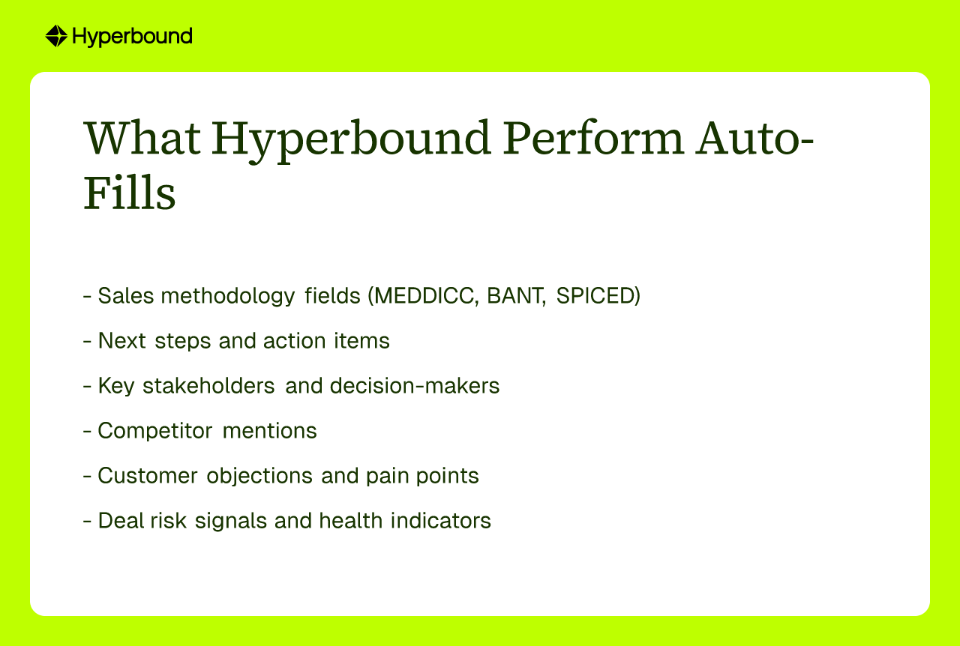
CRM fields populated:
Supported CRMs: Salesforce, HubSpot, Pipedrive
The standout feature: Perform doesn't just analyze individual calls in isolation — it rolls up insights across the entire deal lifecycle, from the first cold call to the closing conversation. Its AI Deal Coaching surfaces what's helping or hurting each opportunity and recommends specific actions to keep it moving forward. When it spots a skill gap — say, weak objection handling on a late-stage call — it automatically queues up a targeted Bitesized Roleplay from Hyperbound Practice so the rep can practice the exact scenario before the next meeting.
The result is a continuous improvement loop: Score Real Calls → Identify Skill Gaps → Practice Roleplays → Close More Deals. Customers like Vanta saw 60% ramp reduction (from 210 to 72 days) and 5x pipeline growth using Hyperbound's platform.

Key limitation: Hyperbound Perform isn't a passive "set it and forget it" logger. It delivers maximum value when your team actively engages with the deal coaching recommendations and practice loops. If you're only looking to check the "CRM hygiene" box, you'll be underusing the platform.
Primary data source: Sales calls, video meetings, and email interactions
Sybill is one of the most purpose-built CRM auto fill AI tools on the market. After every call or email exchange, it automatically pushes structured updates into your CRM — no human review required.
CRM fields populated: Sybill targets a 100% field fill rate across standard and custom fields, using Custom AI Prompts trained on each rep's past writing style so entries look authentic, not robotic.
Supported CRMs: HubSpot, Salesforce, Zoho, and Dynamics 365
Key promise: Sales teams report saving up to 14 hours per week on administrative tasks — a meaningful reclaim of selling time at scale.
Key limitation: Admin access is required to configure Sybill's settings, which can create a bottleneck in teams that want reps to self-serve their setup. It also stops at data capture — there's no integrated coaching layer to turn what it logs into improved deal execution.
Primary data source: Recorded calls, emails, and meetings
Modjo distinguishes itself with flexible automation modes: teams can choose between semi-automation (review before pushing) or full automation (direct CRM updates). This makes it appealing to RevOps leaders who want accuracy controls without killing efficiency.
CRM fields populated: Supports all standard and custom fields linked to Leads, Contacts, Deals, or Accounts. Modjo claims 90% of CRM fields can be filled automatically, saving reps between 2.5 to 4 hours per week.
Supported CRMs: Compatible with most traditional CRM platforms.
Key limitation: Modjo is primarily a conversation intelligence tool with auto-fill capabilities layered on top. It lacks a closed-loop mechanism to connect what's captured in the CRM to targeted rep coaching or deal-level interventions. It tells you what happened — it doesn't tell you what to fix.
Primary data source: Email and call transcripts
Aircover positions itself as an in-meeting AI assistant that captures what matters — real-time meeting notes, action items, and follow-up commitments — and syncs them back to the CRM automatically.
CRM fields populated: Primarily specializes in meeting notes and action items captured during live or recorded calls.
Supported CRMs: Works with several popular CRM systems.
Key limitation: Aircover shines in the moment but doesn't provide deep longitudinal analytics or deal-level pattern recognition. If you need a tool to surface deal risk across a 90-day sales cycle, Aircover isn't built for that depth. Its value is front-loaded around meeting capture, not strategic deal intelligence.
Primary data source: All structured and unstructured data within the Salesforce ecosystem (emails, calls, records, activity history)
If your team runs entirely on Salesforce, Einstein is the path of least resistance. It's deeply embedded in the platform, which means zero integration friction and seamless updates across opportunity fields, campaign records, contact information, and activity timelines.
CRM fields populated: Opportunity fields, campaign engagement records, contact and account enrichment, activity history.
Supported CRMs: Salesforce only.
Key limitation: Einstein's biggest strength is its biggest constraint — it only works if Salesforce is your source of truth. For teams using HubSpot, Pipedrive, or a multi-CRM setup, it's a non-starter. There's also a meaningful skills gap: getting the most out of Einstein often requires Salesforce admin expertise that smaller teams may not have in-house.
Primary data source: Email communication and meeting records logged within HubSpot
HubSpot's native AI features take a similar approach to Einstein: they're designed to streamline work within the HubSpot ecosystem, reducing manual entry for teams already living in that platform.
CRM fields populated: Primarily covers contact information, engagement history, and activity timeline entries. It also surfaces recommended next steps based on email and meeting data.
Supported CRMs: HubSpot only.
Key limitation: HubSpot AI Autofill is a "walled garden" solution. It cannot sync with external CRMs or operate across a multi-tool stack. Teams that use HubSpot as a marketing CRM but log deals elsewhere will find limited applicability. Like Einstein, it also stops at data logging — there's no coaching intelligence layer on top.
Primary data source: Email histories, call notes, meeting records, and public web data for enrichment
Streak takes a notable approach by combining internal conversation data with web-sourced enrichment. When a rep logs a new contact, Streak's AI can automatically pull company size, industry, and location from public web sources — reducing research time alongside entry time.
CRM fields populated: Next steps, deal stages, key dates, lead context, and enriched firmographic data (company size, industry, location).
Supported CRMs: Primarily built for Streak's own Gmail-native CRM.
Key limitation: Streak's auto-fill is a strong feature for Streak users. But it's not a standalone CRM auto fill AI layer that can sit on top of Salesforce, HubSpot, or Pipedrive. Teams not already using Streak as their primary CRM will find limited transferability.
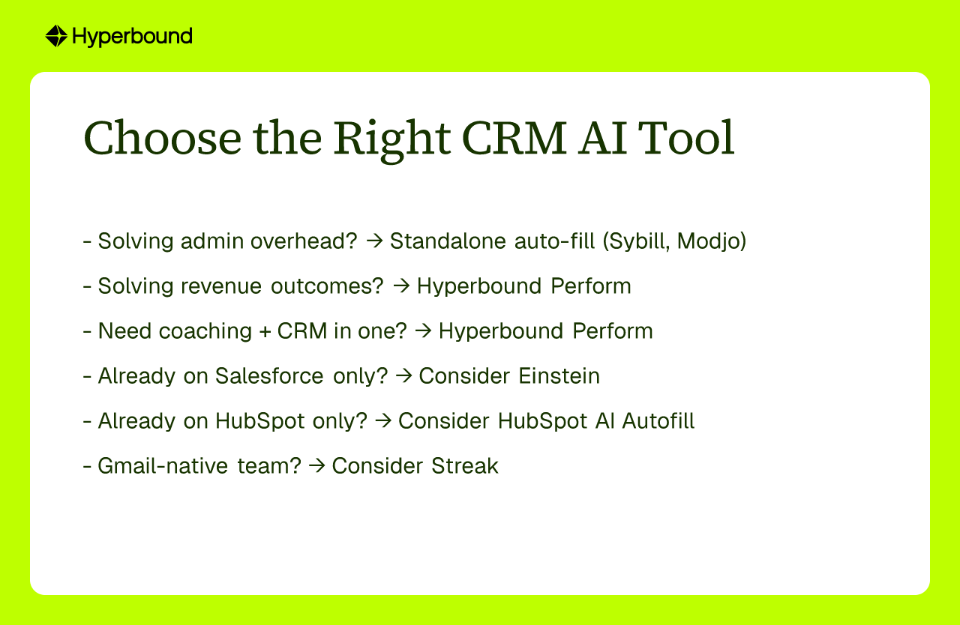
Every tool on this list eliminates some version of the "back and forth with my CRM was so much pain" problem. (Source) But the right choice depends on whether you're solving an admin problem or a revenue problem.
.png)
Choose a standalone CRM auto fill AI tool (like Sybill or Modjo) if:
Choose Hyperbound Perform if:
Manual CRM data entry is a tax on your revenue team — one that compounds quietly until your forecast is fiction and your reps are spending Friday afternoons in Salesforce instead of closing. The good news: CRM auto fill AI has matured to the point where that tax is genuinely optional.
But there's a meaningful difference between tools that log data and tools that use data. Most tools on this list will clean up your CRM hygiene. Only one closes the loop between what happens on a call, what gets captured in the CRM, and what the rep should do differently on the next call to win the deal.
If you're ready to move beyond data entry and start activating your revenue data, Hyperbound Perform is built for exactly that.
CRM auto fill AI is a technology that automatically populates your Customer Relationship Management (CRM) system with data from sales activities like calls, emails, and meetings. It uses artificial intelligence to understand conversations, identify key information like next steps or competitor mentions, and update the relevant fields in your CRM without manual data entry.
Automating CRM updates is crucial because it saves reps significant time and improves data quality. Sales reps can spend over 5 hours a week on manual data entry—time that could be spent selling. Automation ensures CRM records are complete, accurate, and timely, providing a reliable source of truth that leads to better forecasting and more closed deals.
Most CRM auto fill AI tools work by integrating with your communication platforms (like Zoom, Google Meet, or email) to access sales conversations. They record and transcribe these interactions, and then their AI models analyze the text to extract specific data points. This information is then automatically mapped and pushed into the corresponding fields in your CRM.
The main difference is what they do with the data. A basic AI note-taker primarily transcribes and summarizes calls, leaving the rep to act on the information. An advanced CRM auto fill tool, like Hyperbound Perform, goes further by populating structured CRM fields (like deal risks and sales methodologies) and using that data to provide deal-level coaching and recommend actions to help win the deal.
AI can auto-fill a wide range of information, from simple call notes to structured fields like key stakeholders, competitor mentions, customer pain points, budget, timeline, and next steps. The most advanced tools can also populate complex sales methodology fields (e.g., MEDDICC, BANT) and identify deal risk signals.
To choose the right tool, first identify your primary goal. If you are solving an administrative problem like saving time on data entry, a standalone auto-fill tool may work. If you are solving a revenue problem and want to use data to improve sales outcomes and coaching, you should consider an integrated platform like Hyperbound Perform that connects data capture with actionable coaching.











Use Cases
Legal