
You've just wrapped up another hour-long Zoom meeting. Your hand is cramping from frantic note-taking, you missed key points while typing, and now you're staring at a jumbled mess of incomplete thoughts. Sound familiar?
In a sea of AI notetaking tools—many just "bolting AI onto legacy note tools" as frustrated users point out—finding the right solution can feel like a project in itself. You might be wondering, "Sometimes it's just hard to pick one, ya know?" as one Reddit user lamented.
Even worse, you might end up with what another user described as "a neatly organized archive you never actually use," solving nothing.
This guide cuts through the noise. In less than 5 minutes, you'll learn exactly how to set up an AI notetaker for Zoom that actually works, whether through Zoom's native AI Companion or a powerful third-party tool. No more splitting attention between listening and typing. No more missing critical details.
Today is your last day of manual note-taking.
Before diving into setup, let's quickly address why this 5-minute investment will transform your meetings:
.png)
If you have a paid Zoom Workplace plan, you already have access to a powerful AI notetaker built right in—no third-party apps required.
Who it's for: Users on paid Zoom plans who want seamless integration without additional tools.
Step-by-Step Activation:
That's it! Your next Zoom meeting will automatically generate an AI-powered summary.
Standout Features:
Not on a paid Zoom plan? Need more advanced features? Third-party AI notetakers offer powerful alternatives with unique capabilities.
Who they're for: Users on free Zoom plans, or those needing specialized features like cross-platform support (Microsoft Teams, Google Meet), deeper integrations, or advanced AI capabilities.
Best for: Sales teams who want to turn meeting analysis into improved performance.
While standard notetakers capture what was said, platforms like Hyperbound analyze how it was said to identify winning behaviors and scale them across your team. It's designed not just for recall, but for active coaching and skill development.
After the call, you get more than a transcript. You get actionable insights on what top performers do differently, allowing reps to practice those scenarios with AI-powered roleplays.
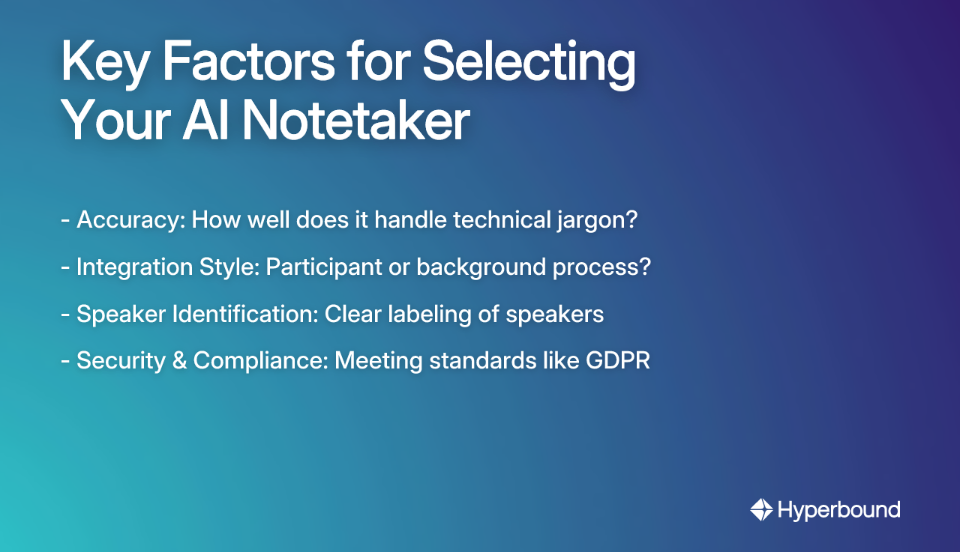
With the market feeling "super fragmented" as users note, how do you choose the right tool? Consider these factors:
Here's a quick look at top contenders based on user feedback and specialized strengths:
Setting up an AI notetaker is just the beginning. The real challenge, as one Reddit user pointed out, is that "You just end up with a neatly organized archive you never actually use." Let's solve that problem by turning your AI notes into actionable resources:
Don't just read the summary. Use your tool's AI to automatically identify and list action items. Most modern AI notetakers can:
For example, a good tool can automatically detect when someone says "I'll send that report by Friday" and create a trackable action item with the deadline included.
Your transcripts are now a searchable knowledge database—use them! This directly addresses the common frustration that many tools "don't solve recall, just capture or summarize information."
The most advanced tools don't just summarize—they help you improve. Sales coaching platforms with built-in notetaking capabilities, like Hyperbound, use the meeting data to drive skill development:
Turn a single meeting into multiple assets. Use your AI notetaker to transform discussions into:
This approach ensures your captured information actively serves your workflow rather than gathering digital dust.
Setting up an AI notetaker for Zoom is a five-minute task with an enormous return on investment in time, attention, and information management.
Whether you choose Zoom's seamlessly integrated AI Companion or a more advanced tool like Hyperbound for specialized coaching, you're just a few clicks away from transforming how you experience and leverage your meetings.
Don't let another meeting go by with frantic, incomplete note-taking. Pick a tool from this guide and set it up before your next call.
Your future, more focused self will thank you—and so will your team when they receive those crisp, actionable summaries instead of vague follow-up emails.
The days of trying to listen, contribute, and take notes simultaneously are officially over. Welcome to meeting 2.0, where AI handles the administrative work while you focus on what truly matters: the conversation and connections that drive your work forward.
An AI notetaker for Zoom is a tool that automatically transcribes, summarizes, and identifies key insights from your video meetings. Instead of manually typing notes, the AI listens to the conversation and provides you with a detailed record, action items, and a concise summary after the meeting, allowing you to stay fully engaged in the discussion.
You can set up an AI notetaker in under five minutes through two primary methods. First, if you have a paid Zoom plan, you can enable the built-in AI Companion directly in your Zoom web portal settings. Alternatively, you can sign up for a third-party service like Hyperbound, Otter.ai, or Fireflies.ai and connect it to your Zoom account, which is ideal for users on free plans or those needing advanced features.
No, Zoom's AI Companion is not available on the free Basic plan. It is included at no additional cost for users on paid Zoom Workplace plans (Pro, Business, Business Plus, Enterprise). If you are on a free plan, you will need to use a third-party AI notetaking tool.
Yes, in most cases, other participants will be notified that an AI tool is recording or transcribing the meeting. Zoom's AI Companion and many third-party tools will either show a recording indicator or have a "bot" participant join the call to ensure transparency and comply with consent regulations. It is always best practice to inform attendees that the meeting is being recorded.
Reputable AI notetakers prioritize security and compliance with standards like GDPR. For instance, Zoom states it does not use your audio, video, or chat content to train its AI models. When choosing a third-party tool, always review its privacy policy to understand how your data is stored, processed, and protected.
A standard AI notetaker focuses on capturing and summarizing what was said in a meeting. A sales coaching platform, like Hyperbound, goes further by analyzing how things were said. It provides data-driven insights, scores calls against your sales methodology, and identifies coaching moments to help improve team performance, turning every meeting into a learning opportunity.
To avoid creating an archive you never use, actively integrate the notes into your workflow. Use the AI to automatically generate and assign action items to project management tools like Asana or Slack. Utilize the searchable transcript to quickly recall specific details. For sales teams, leverage platforms that turn conversation insights into coaching and practice scenarios to actively improve skills.







Use Cases
Legal